


It very important that you speak to your client about defining the goals of their Physical Social Engineering assessment, as these will determine where you direct your resources once you gain access. In this scenario, we are assuming that our client is interested to see how far we can get, including connecting to their network but stopping before engaging in computer and network exploitation.
This final step, once you have gained access, is a key part of your report that demonstrates business impact. This is the part that creates buy-in from management for the tools and workforce needed to remediate your findings and secure the organization. ‘Kerberoasting Domain Admins’ doesn’t drive leadership decisions with the same urgency as ‘Exfiltrating Customer Database’. Management may feel that things won’t be that bad if a malicious attacker were to gain access, and it’s your job to show if critical data like Personally Identifiable Information (PII) such as credit card numbers, healthcare records covered by HIPAA, and other critical data and items could be looted.
Looting the Environment
After you enter the target area, assuming you are alone, the next step is one of my favorites: pillaging and looting. As you never know how much time you may have before someone catches you and forces you to leave, you always want to establish persistence and go for the highest value targets first, leaving the lesser fruit for later.
Server Room/Data Center
First, you’ll want to see if you can access the server room/data center and, if so, determine what counter measures may be in place. A boroscope is a great piece of kit that allows you to sweep behind the door for physical controls, such as motion detectors and cameras. But, if you can get in, you basically own the network environment. Even if you happen to be detected while doing so, a server room breach is usually game over because of the potential damage that can be inflicted before being apprehended. However, we’ve found that, more often than not, server room security stops at the door. Further, it’s uncommon for endpoint-targeted controls to be in place on servers and network infrastructure, so even the most sensitive assets become low-hanging fruit. When in the room, you’ll want to look for things such as:
- Can you access the network by plugging into a switch port? What do you have access to from that network segment?
- Are there passwords placed anywhere in the room? Look for Post-it notes, notebooks, white boards, etc.
- Are any of the servers logged in? Can you connect to them and use them?
- Is there an access control system you can manipulate from the server room?
- Can you access the security camera system?
- Are there special access badges stored in the server room?
- Are there backup drives sitting out? Are they encrypted?
Red Team Edit: Server Room/Data Center
On Red Team engagements, the rules often allow network testing from any point of access you acquire. But gaining access to a server room or data center on a Red Team engagement can escalate your attack path quickly. Install one or two network implants to establish persistence, in our case often a Raxis Transporter Raspberry Pi or Dell Micro, and alert the remote members of your team to check access and see if the devices are on a shared network. This access can give your team access to critical systems long after you’ve evaded the guard and left the building.
Front Desks and Reception Areas
After you finish in the server room, you’ll then want to move to the front desk. We often go to it first in small/medium sized offices, as it’s treated like a go-to point for employees and staff. You’ll want to start by looking for:
- Spare/contractor access badges for the building
- Building master keys stored insecurely
- Employee badges or IDs
- Logged-in computers
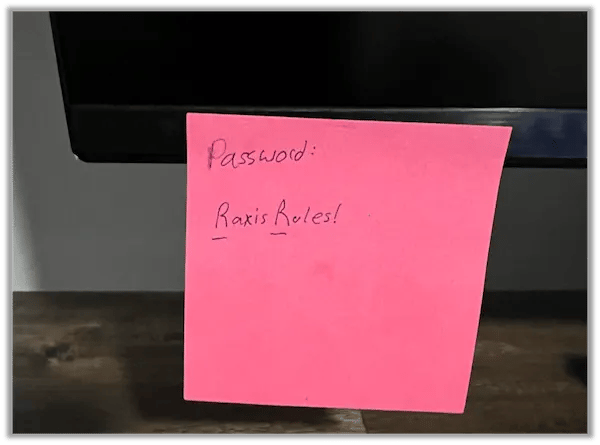
- Notes with passwords
- Lists of internal phone numbers and names
- Portable storage devices (Can you access them? Are they encrypted)
- Company monogrammed gear such as clothing and badge holders that would allow you to blend in
- Laptops: shove them in your bag and worry about access afterward. They often contain cached credentials and wireless profiles to facilitate authorized network access.
Red Team Edit: Front Desks and Reception Areas
While on PSE assessments, you’ll often just take photos of these items; on red team assessments, you will want to take and attempt to use several of these items. A badge may get you back in the door after hours when no one is around. Even a list of internal phone numbers and vendor names allows your team to vish, or phone phish, the organization directly as a trusted vendor. Some badges can be copied and cloned on site using a FlipperZero or XCopy device. This is ideal because it leaves no evidence of a missing badge – and no reason to disable its access.
Desks and Drawers
After the front desk, you’ll want to move on to all other areas. You’ll be looking for similar items as the front desk but with a few additions:
- Sensitive data on desks, printers, fax machines, unlocked file cabinets, or desk drawers
- Company data
- Client information
- Business cards
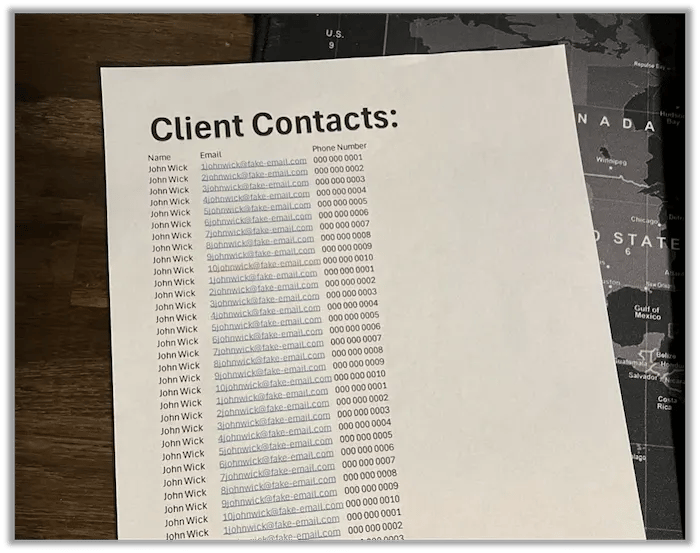
- Company or client contact lists
Red Team Edit: Desks and Drawers
Red team engagements often include creative action such as internal phishing campaigns using compromised accounts. Often, you can find documents with connections between employees sitting on or in desks. This helps your team target specific users in their phishing campaigns.
Say that you have been tasked with obtaining access to the Human Resources area and files. Names and information you find at employee desks may give you the information you need to talk your way in and even pretend to be a specific employee.
In some jurisdictions, it may be illegal to go beyond just observing what’s plainly visible on an employee’s desk. A ‘get out of jail’ document should specifically call this out as permissible if possible. If this is a concern, consult with a labor attorney first to avoid difficult debrief conversations.
Miscellaneous Discoveries
Finally, depending on the areas where you have access, you’ll want to see what else might be useful. Look for things like:
- Whiteboards
- Any sensitive data pasted on them?
- Company data
- Wi-Fi passwords
- Closets – company branded items
- Clothing
- Badge holders
- Bags
- Anything that can bring you legitimacy and make people think you belong
- Network ports:
- Are there open network ports? Are they patched?
- Can you get an IP when connecting to a network port?
- If so, are you on the organization’s internal network or has NAC banished you to purgatory?
- Printers, scanners, and fax machines:
- Is there any data left out on printers and other devices?
- Can you reprint the last documents that were printed?
Finishing Up
Keep in mind throughout this process that your goal is to show your customer’s stakeholders real damage that could be done if someone malicious were to gain the access you have. While our team always redacts sensitive information in case the report gets into the wrong hands, photos of the items our team finds make the reader take notice.
While looting is often an energizing part of PSE and Red Team assessments, demonstrating strategic impacts is key to your client’s success while taking next steps after receiving your report.
If you enjoyed this post, take a look at other posts I our Social Engineering category.


