
If humans are the most vulnerable aspect of an organization, then the very passwords that humans choose are an extension that vulnerability. In this blog I’ll introduce the Domain Password Audit Tool (DPAT) that can be used to perform a password audit on your organization’s Active Directory passwords.
Why So Many Insecure Passwords?
Password policies implemented by organizations may require employees to select secure and complex passwords, but our team often finds different results on internal and cloud network pentests. Some users are exempt from the password policies, or, in many cases, they have selected weak passwords that meet password complexity requirements.
In some cases, accounts are older than the password policy and have never been updated to meet the new requirements, and in others the passwords meet the complexity requirements but are still insecure. Remember that Password1! meets many complexity requirements but is present in almost every password guessing wordlist.
How a Password Audit Works
If you are responsible for the security or IT infrastructure at your organization, consider performing a simple password audit of your Active Directory environment. This can help you understand accounts that have very weak passwords, identify user accounts that share a password, and find user accounts that don’t match your stated password policy.
Before beginning this process, ensure you are authorized to perform these actions. You will require Domain Administrator access to a Domain Controller and can potentially see the plaintext passwords of the accounts you are auditing. It is possible to avoid seeing the passwords, but you need to take those precautions yourself.
It is also best practice to use a dedicated system for these tasks and wipe its storage afterward to ensure that plaintext passwords or password hashes never fall into the hands of a malicious actor.
For a simple first pass, consider spinning up a Kali Linux virtual machine. While the CPU-bound password cracking won’t be blazing fast, it can give you an initial starting point to begin auditing particularly weak passwords within your organization.
Tools of the Trade
This guide will show you how to use NTDSUtil, Hashcat, and Domain Password Audit Tool (DPAT) to extract, crack, and analyze Active Directory domain passwords.
This process will involve obtaining a copy of the NTDS.dit database from Active Directory Domain Services, which contains the password hash of every Active Directory user account. This is a very sensitive file, so proper authorization must be in place and precautions taken to ensure it does not fall into the wrong hands.
A note on methodology: It is also possible to extract these hashes remotely in a single step using Impacket’s secretsdump.py against the Domain Controller directly, without ever creating a local copy of NTDS.dit. However, that method relies on Directory Replication Service (DRS) permissions and generates replication traffic that closely resembles DCSync, a well-known credential-theft technique, meaning it can trigger detections your security team has in place. For a self-audit, using NTDSUtil to create a local Install-From-Media (IFM) copy is a more predictable and Microsoft-supported approach that only requires local administrative access to the Domain Controller.
A password audit can absolutely be performed safely by ensuring secure transfer of the file and destruction of the file once the audit has been completed. Maintaining a proper audit trail and performing the audit with full knowledge of your IT and security teams is crucial to a successful audit.
To get started you will need the following:
- Active Directory Domain Controller
- Domain Administrator credentials
- Kali Linux VM
- Domain Password Audit Tool (DPAT)
- Hashcat
The process involves the following steps:
- Log into a DC with Domain Administrator credentials
- Obtain the NTDS.dit database
- Obtain privileged group memberships
- Extract password hashes from NTDS.dit
- Crack weak password hashes
- Analyze the results with DPAT
Environment Setup
Prepare a Kali Linux VM to perform the password crack and audit from. This will allow you to easily secure the hashes and plaintext credentials. Kali Linux can be downloaded from http://kali.org and has ready-to-go VMware and VirtualBox VM’s that can be imported and useable in minutes.
Once you have a Kali Linux VM, we will be transferring the sensitive NTDS.dit file to the VM via an encrypted SMB share. Make sure your VM is accessible over the network to your Domain Controller.
Gathering the Active Directory Database
The first step is to obtain a copy of the NTDS.dit database, which is the Active Directory database containing all password hashes for the domain. This file is very sensitive as the hashes contained within can be used to compromise every single account if it falls into the wrong hands.
In this guide we will take measures to ensure this file is transferred securely and stays within our environment.
Log into a Domain Controller with Domain Administrator credentials. We will be using NTDSUtil to create a copy of the NTDS.dit and SYSTEM registry hives. These two files will be used to decrypt the database and obtain the hashes so that we can attempt to crack weak passwords.
Open an Administrative PowerShell terminal and run the following command:
ntdsutil "activate instance ntds" "ifm" "create full c:\pw-audit" quit quit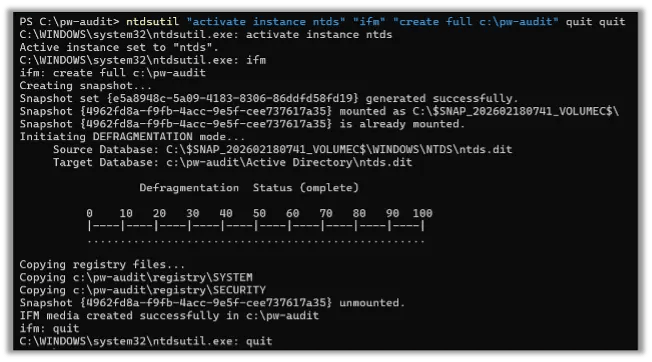
You will find a couple of new folders that contain the NTDS.dit and SYSTEM registry hive:
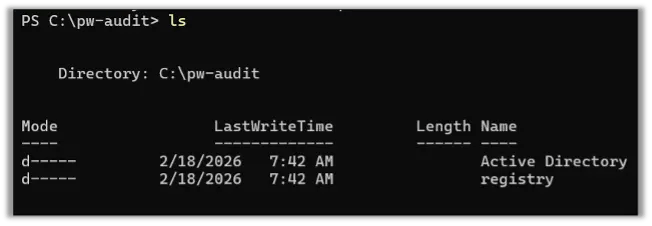
Run the following to compress these into zip files for easy transfer to our Kali Linux VM later:
Compress-Archive -Path "C:\pw-audit" -DestinationPath "C:\pw-audit.zip"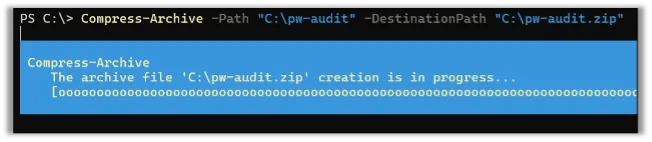
While we’re on the Domain Controller, we can grab a list of privileged groups for analysis. DPAT will analyze user accounts within groups that have shared passwords. This is particularly useful for identifying privileged accounts that may share the same password as a non-privileged user account.
The following PowerShell code will export a list of AD group members to text files for DPAT and zip them up for transfer. Adjust the groups as you see fit and add any other sensitive groups, such as Accounting or Human Resources, that could be especially dangerous if re-using passwords:
New-Item -ItemType Directory -Force -Path ".\ADGroups" | Out-Null
$groups = @(
    "Domain Admins",
    "Enterprise Admins",
    "Schema Admins",
    "Administrators",
    "Account Operators",
    "Backup Operators",
    "Server Operators",
    "Print Operators",
    "Domain Controllers",
    "Read-only Domain Controllers",
    "Group Policy Creator Owners",
    "Cryptographic Operators",
    "Distributed COM Users"
)
$groups | ForEach-Object {
    Get-ADGroupMember -Identity $_ -Recursive -ErrorAction SilentlyContinue |
    Select-Object -ExpandProperty SamAccountName |
    Out-File ".\ADGroups\$_.txt"
}
Compress-Archive ".\ADGroups\" ".\ADGroups.zip"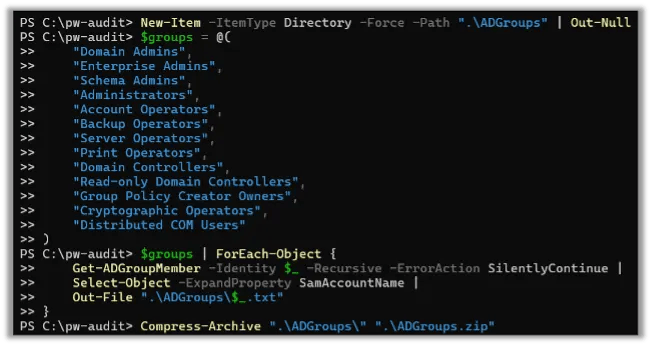
With the two zip files, the NTDS info, and the ADGroups, we can transfer these files securely to our Kali Linux VM where we will be performing the audit.
We can use Impacket’s smbserver script to setup an SMB server to easily and securely transfer these files. On your Kali VM run ip address to get your IP address and then run impacket-smbserver to start an SMB server:
ip address
impacket-smbserver share /home/kali/pw-audit -smb2support -username 'xfer' -password 'Passw0rd!'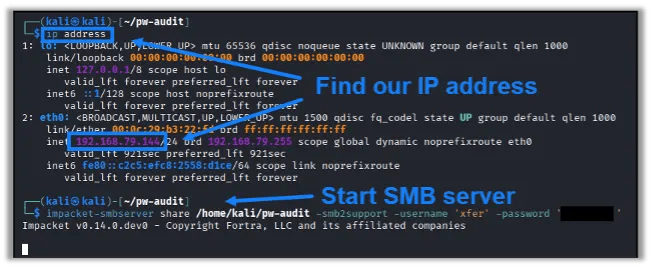
Next, we can go back to the Domain Controller and securely transfer those two zip files over SMB. You can map a new drive letter using the username and password you specified in the command for Kali:
New-PSDrive -Name "Z" -PSProvider FileSystem -Root \\192.168.79.144\SHARE -Persist -Credential (Get-Credential)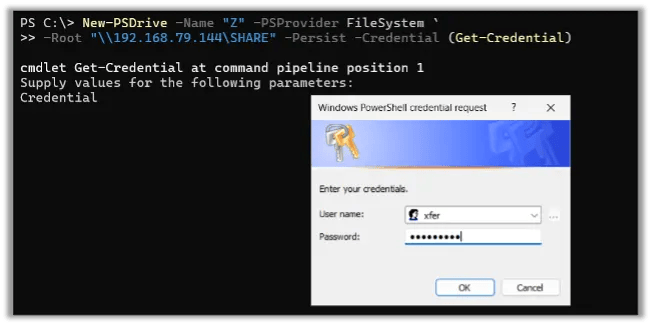
Once the drive is mapped, copy over the two zip files:
Copy-Item "C:\pw-audit.zip" "Z:\"
Copy-Item "C:\ADGroups.zip" "Z:\"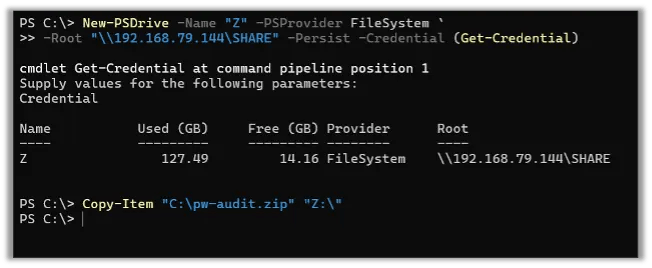
Once both files have finished copying, stop the SMB server on your Kali VM with Ctrl+C rather than leaving it running with an open share and a static set of credentials.
Cleaning Up the Domain Controller
Before moving on, remove the sensitive files you staged on the Domain Controller. Delete the pw-audit.zip and ADGroups.zip archives along with the original pw-audit and ADGroups folders and their contents (the NTDS.dit copy, the SYSTEM registry hive export, and the exported group membership text files) from the Domain Controller’s local disk. Also remove the mapped drive and the credentials used to connect to it. Confirm the files are gone rather than just sent to the Recycle Bin, since recoverable copies of NTDS.dit are just as dangerous as the original. Leaving these files behind, even temporarily, defeats the purpose of transferring the database to a dedicated, isolated system in the first place. The same applies to the Kali VM itself once the audit is complete. Remember that the DPAT generated customer.ntds file, the Hashcat potfile, and the DPAT report all contain cracked plaintext passwords and should be wiped along with the rest of the VM’s storage, as noted earlier.
Converting and Cracking
Now that our highly sensitive Active Directory database is safe and sound on our Kali Linux VM we can begin converting the file and cracking it with Hashcat. We will be using more of Impacket’s tools for this task.
We’ll begin by creating and activating a Python virtual environment to ensure all required libraries are available. Then we’ll install Impacket using pip3:
python3 -m venv venv
source venv/bin/activate
pip3 install impacket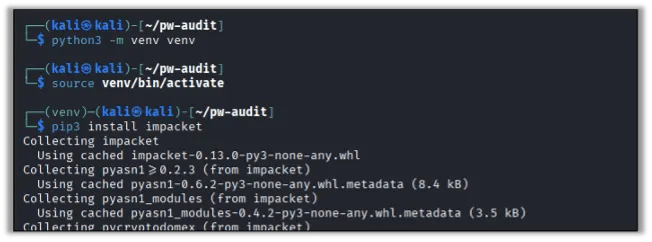
Note: As of writing, if your Active Directory environment is Windows Server 2025, you will also need to install the following Python library:
pip3 install dissect-esedbNext, we can use Impacket’s secretsdump.py script to convert the NTDS file to a Hashcat-compatible file for cracking:
secretsdump.py -ntds "Active Directory/ntds.dit" -system "registry/SYSTEM" LOCAL -outputfile customer -historyNote: If you obtained the NTDS file from Windows Server 2025, run the following command instead:
python3 -m dissect.esedb.tools.impacket venv/bin/secretsdump.py -ntds "Active Directory/ntds.dit" -system "registry/SYSTEM" LOCAL -outputfile customer -history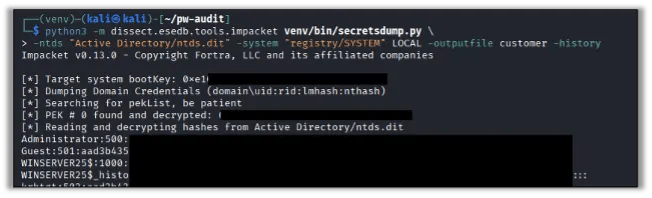
When the command finishes you will be left with three new files:
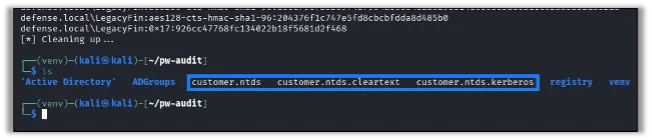
Next, we will feed the customer.ntds file into Hashcat to try to crack as many weak passwords as possible. For an initial first pass you can use the rockyou.txt wordlist that comes pre-installed on Kali Linux.
Check out some of our other blogs on password cracking to learn how to develop an effective wordlist, including how to use CeWL to create a targeted wordlist based on your company website, using Psudohash to create a password dictionary attack list, and our list of eight steps to take to crack difficult passwords.
hashcat -m 1000 customer.ntds /usr/share/wordlists/rockyou.txt --username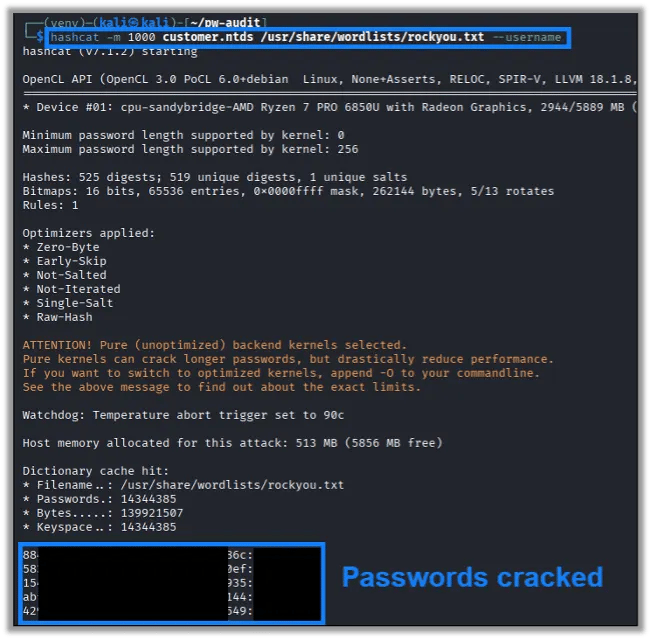
While Hashcat is running we have the risk of exposing cleartext passwords to the analyst performing this audit. If you want to avoid knowing the passwords in use in your environment, you need to ensure that you avoid keeping too close of an eye on the Hashcat output. Once hashcat is completed we can move on to the next step.
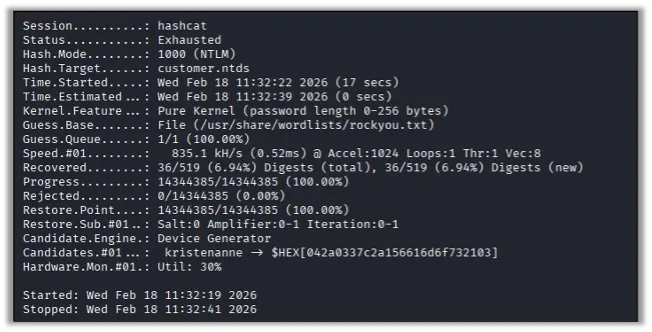
Analyzing with DPAT
Now that we have successfully cracked some weak passwords, we can move on to using Domain Password Audit Tool (DPAT) to start analyzing and reporting on these weak passwords.
Continuing on our Kali Linux VM, clone the git repository for DPAT:
git clone https://github.com/clr2of8/DPAT.gitIf you are still within the Python virtual environment as before, you should already have the pre-requisites. If not, run the following to install them:
pip3 install -r DPAT/requirements.txtWe will run DPAT with the following options:
- -n: The ntds file of password hashes
- -c: The Hashcat potfile of cracked hashes
- -p: The password policy length
- -s: Sanitize output and mask cleartext passwords in the reports
- -g: Groups folder with group memberships
python3 DPAT/dpat.py -n customer.ntds -c ~/.local/share/hashcat/hashcat.potfile -p 8 -s -g ADGroups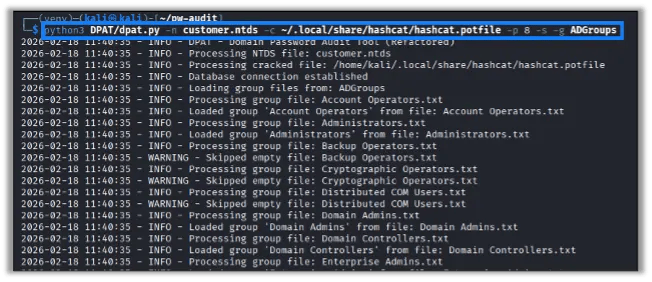
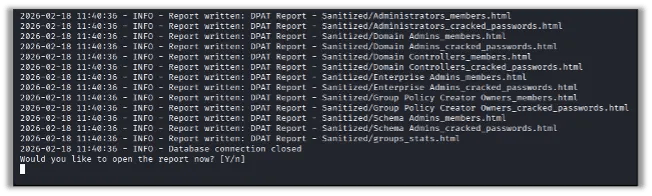
Once finished it will prompt you to open the report in your browser:
Report Breakdown
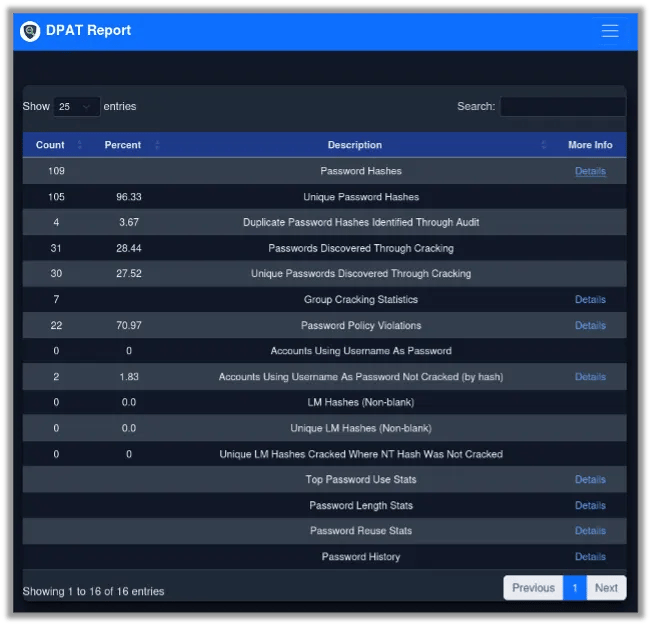
Let’s take a look at the report DPAT creates. On the main page we are given an overview of categories with some linking to more detailed information. Toward the bottom of the page there are a few graphs to help visualize the state of the analyzed passwords.
Here is a description of each of the report categories:
| Password Hashes | This is a total count of password hashes that were obtained. The details page shows each individual password hash, and the cleartext equivalent if it was cracked. Sanitized reports have the hashes and cleartext masked. |
| Unique Password Hashes | This is a count of unique passwords. If this number differs from the above total hashes, it indicates password re-use within the organization. |
| Duplicate Password Hashes Identified Through Audit | The count of duplicate passwords found by matching hashes. |
| Passwords Discovered Through Cracking | Total number of weak passwords that were cracked. |
| Unique Passwords Discovered Through Cracking | Total unique cracked passwords, which may differ from above if a re-used password was cracked. |
| Group Cracking Statistics | Total count of groups analyzed. Details page indicates total number of cracked passwords for users belonging to one of the analyzed groups. This could indicate groups within the organization that frequently use weak passwords. |
| Password Policy Violations | Count of passwords that are shorter than the specified password length as indicated in the “-p #” parameter. |
| Accounts Using Username As Password | Number of accounts where the password is the same as the username where the password was cracked. |
| Accounts Using Username As Password Not Cracked (by hash) | Total number of accounts that have their password the same as their username. Determined by hashing the username and comparing it to the password hash. |
| LM Hashes (Non-blank) | Total number of LM hashes, which use a weaker, outdated hashing algorithm and should be disabled. |
| Unique LM Hashes (Non-blank) | Total unique LM hashes. |
| Unique LM Hashes Cracked Where NT Hash Was Not Cracked | Number of LM hashes that were cracked where the NT version of the hash was not cracked. |
| Top Password Use Stats | Statistics which reveal the count of passwords within the environment. Useful for determining commonly used and re-used passwords. |
| Password Length Stats | Details of passwords lengths, including a list of user accounts with passwords of the specified length. |
| Password Reuse Stats | Report detailing the hashes of re-used passwords, and the cleartext version if it was cracked and not sanitized. |
| Password History | If a user had multiple weak passwords cracked, this includes their previous password that was cracked. |
Cracked Passwords
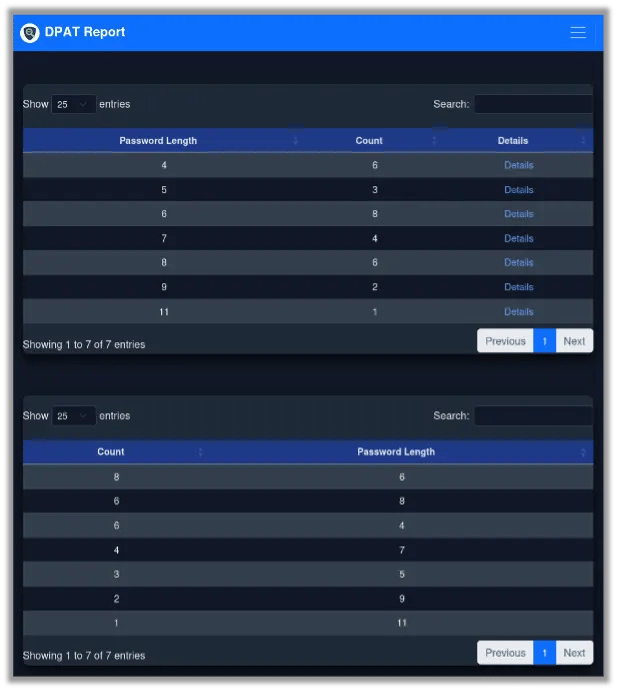
For our lab environment we can see that over 25% of our passwords were cracked, and our password lengths are mostly around the 6-character mark:
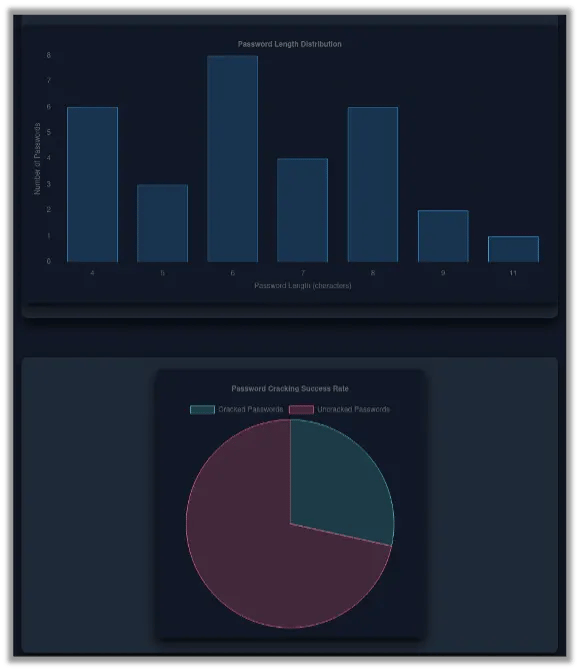
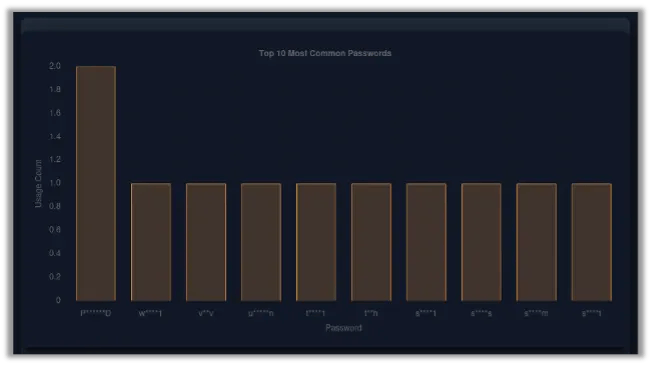
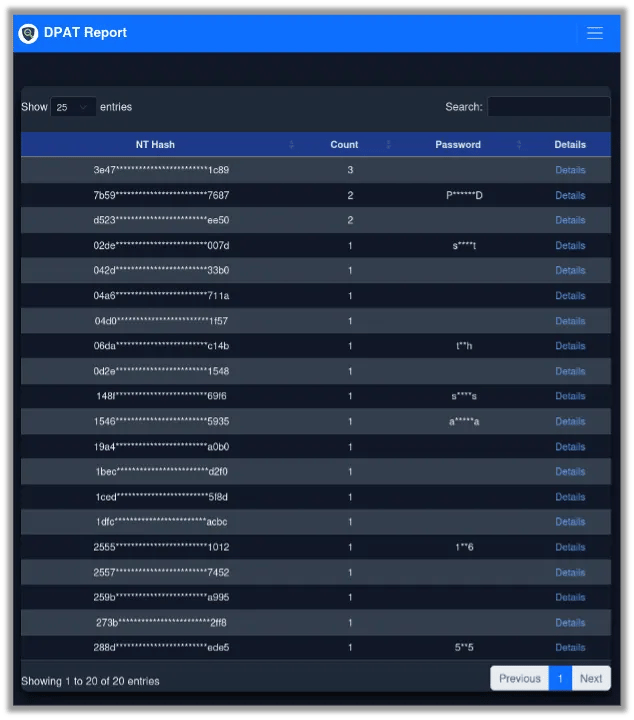
While this report is sanitized, we can see that we have one password that was used twice. If we run a non-sanitized report, we could see what this password was:
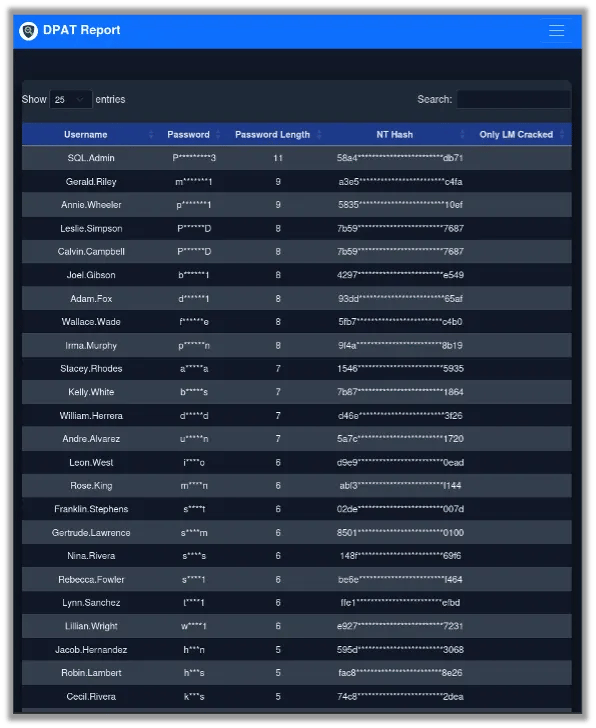
Taking a look at the total password hashes, we can see every user account, the cleartext password that was cracked, and the associated NT hash:
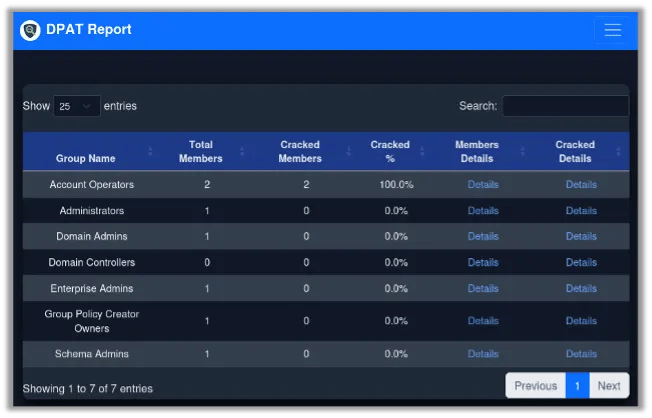
The Group Statistics report reveals that our Account Operators group had two user accounts, and both of those accounts had weak passwords that were cracked. This gives us a good idea of which groups to target for password education:
Password Policy Violations & Other Concerns
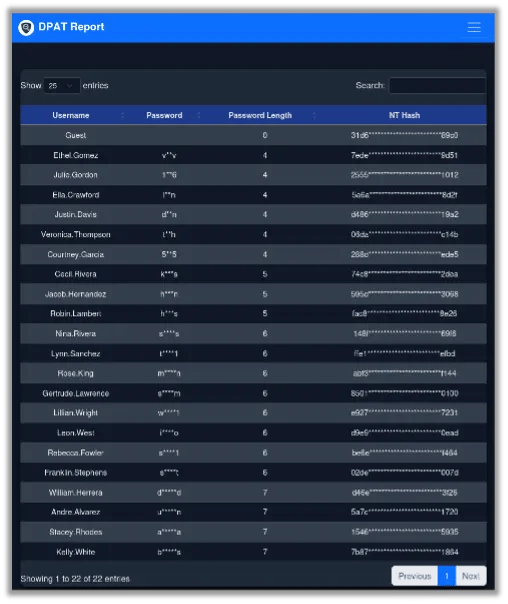
Next up is Password Policy Violations. When we ran DPAT we specified our password policy was 8 characters long, and we can see a lot of accounts that have passwords shorter than this. This indicates users that may have not changed their password since the new password policy was implemented.
Note: Raxis recommends user passwords of at least 12 characters and administrator and critical passwords of at least 16 characters.
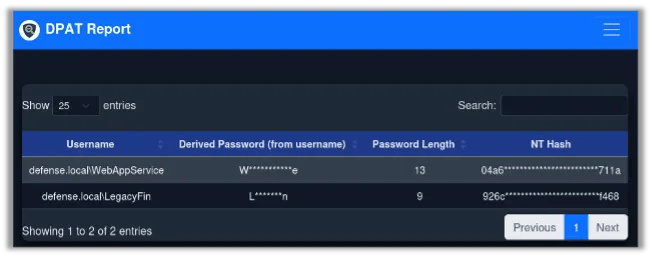
The Accounts Using Username As Password Not Cracked (by Hash) report shows that we have two accounts where the password is the same as the username. These service accounts need to have their passwords rotated. When attempting to crack passwords, it is commonplace to include the username itself as a potential option:
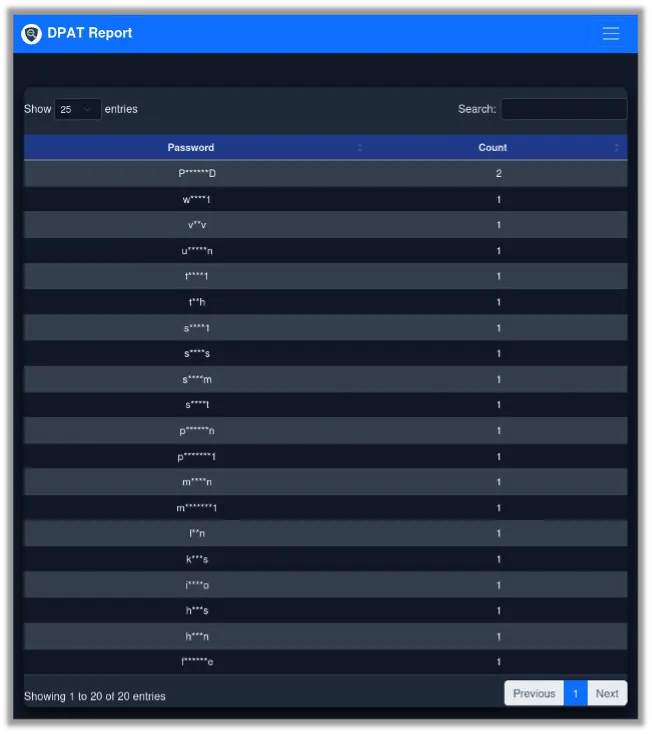
The Top Password Use Stats report reveals that one password is used twice by two separate users:
The Password Length Stats report details the count of passwords at various lengths. This is useful for determining how many passwords don’t meet the minimum length requirements. It is also useful for determining potential new lengths to enforce. For example, if a lot of the environment are already choosing 12-character passwords, we could increase our minimum to 12 with minimal impact to the users:
The Password Reuse Stats report shows that we have a slight problem with password reuse. While only some of these were cracked, we can see that there are multiple instances of users that share the same password:
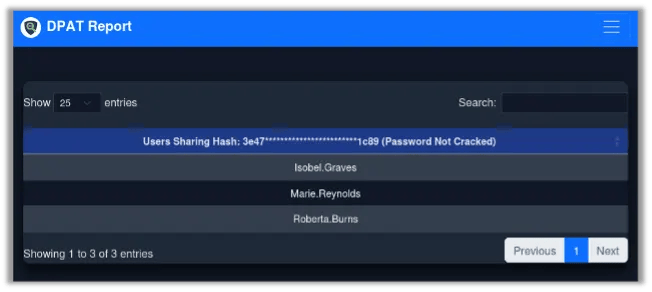
We can drill down into the details here and see exactly which accounts share a password. These are some users that should likely change their passwords. If they consistently show up as having the same password, this could indicate policy violations where users are sharing their password with other users:
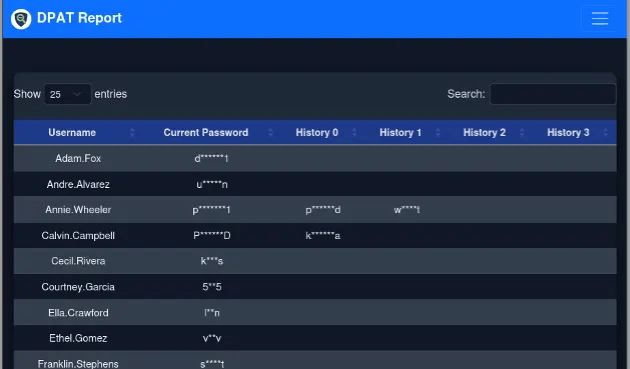
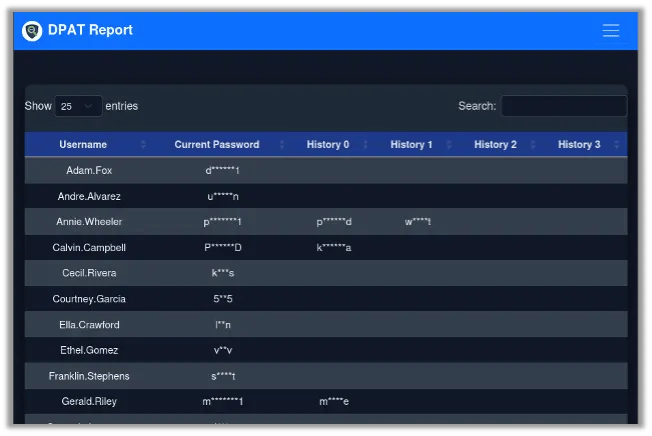
The Password History report shows user accounts with cracked passwords and includes any previous passwords that were cracked. This could reveal users that consistently choose poor passwords:
Guidance for Password Education and Password Policies
Understanding your current standing when it comes to weak and reused passwords is an important first step in implementing a robust password policy for your organization. Performing a self-audit using Domain Password Audit Tool is an excellent starting point. While the above guide can absolutely reveal weak passwords in the wild, and here at Raxis, we often see passwords crack with nothing more than the built-in rockyou.txt wordlist, a truly motivated attacker will employ far more advanced cracking methods that are even more effective.
If you’re interested in testing your internal network and password policy, Raxis’ penetration tests examine the strength of your network controls, and, when Raxis obtains domain administrator access during your engagement, our team provides reports detailing password weaknesses. If this blog has piqued your interest in how well your organization’s password policy works, mention this on your scoping call, and our team can put a special focus on key areas that concern your team.